
Home Setup is a designated Setup that defines the coordinate system and level for the entire registration.
This functionality is similar to Home Scan World in Cyclone Core and allows users to lock the coordinate system and level orientation to a specific Setup, ensuring consistent alignment throughout a project. It is suited for workflows involving mixed scanner orientations, scenarios requiring precise control over level and coordinate system, and environments that emulate Home Scan World behaviour from Cyclone Core.
Home Setup Influence on Registration
When multiple Setups are registered together, their level orientation is determined as follows:
-
Without a Home Setup:
The system calculates an average level across all Setups. -
With a Home Setup:
The level and coordinate system of all Setups are locked to the Home Setup.
This behaviour provides consistent orientation across Setups, even if some are tilted or misaligned.
Setting Home Setup
To set a Home Setup:
-
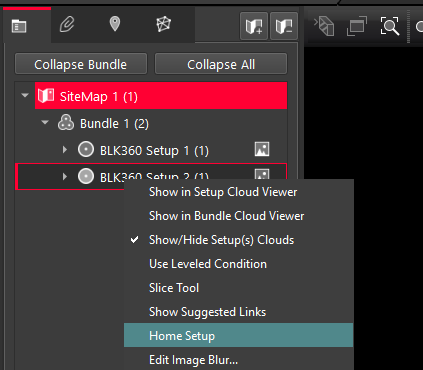
Go to the SiteMap view.
-
Select the Setup you want to use as a reference.
-
From the context menu, click Home Setup.
-
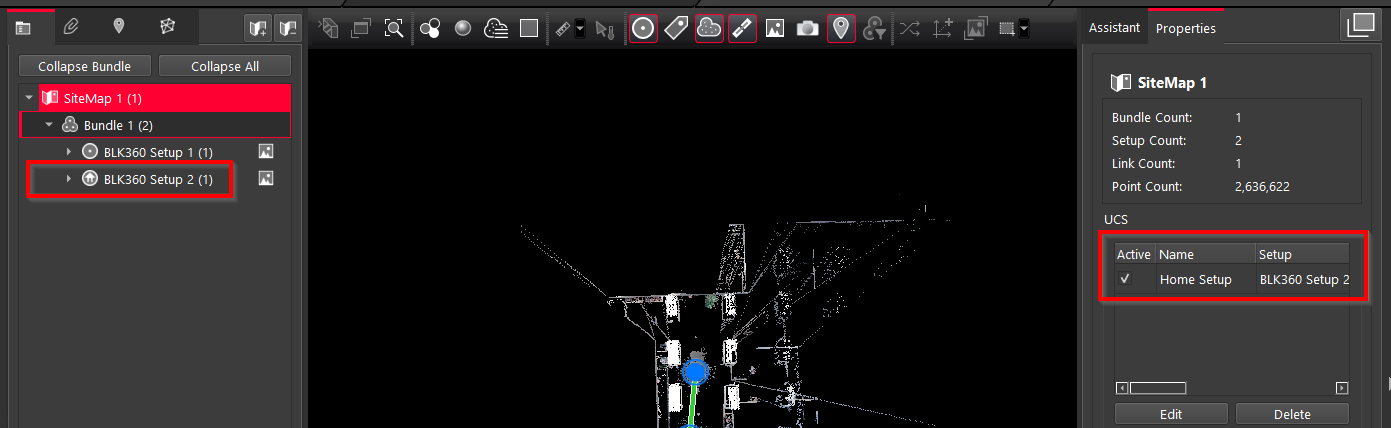
The Setup icon will change to indicate it is now the Home Setup. The coordinate system and level of this Setup will be applied to the entire registration.
Removing Home Setup
To remove a Home Setup:
-
Go to the SiteMap view.
-
Uncheck Active from the Home Setup.
-
Select it and click Delete.
-
The icon will revert to the standard Setup icon.
Note: If a Home Setup is unchecked but not deleted:
-
The level remains active.
-
The coordinate system is no longer applied.