Function
A surface is needed to accurately place the images and draw the stains on the wall for analysis.
Procedure
When defining an origin with a point cloud, the front wall, left wall, and floor are automatically created as surfaces and can be used for the analysis. The surface dialog allows a user to create new surfaces or select an existing surface.
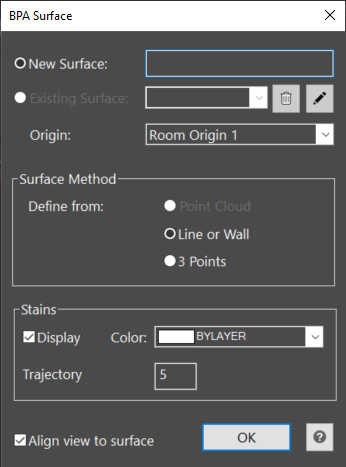
New Surface
Select New Surface and type a unique name.
There are three methods to define a new surface. The surface can be defined from a point cloud, a drawn line or wall, or 3 picked points can define a complex surface.
Point Cloud (only available if point cloud exists in drawing) - When the Point Cloud Surface option is selected, the user will pick a point on the point cloud wall to define the surface. The view will automatically align to this surface.
Line or Wall - When the Line or Wall Surface option is selected, the user will pick an existing line or wall to define the surface. This assumes the wall is always vertical. The user may have measured points from total station or hand measurements that they used to draw a line or a wall. The view will automatically align to this surface.
3 Points - When the 3 points Surface option is selected, the user will pick a point on the surface, pick a second point along the surface, and pick a third point on the surface above the first pick. The user can define the complex 3 point surface from measured points or a point cloud. This allows the user to define a surface that is not vertical. The view will automatically align to this surface.
The stains will be drawn on the current surface with the color and length selected for each surface. Unchecking the display option will hide all the stains for that surface.
Select Ok to define the new surface. The view will automatically adjust to align with the surface unless this option is unchecked.
Existing Surface
Select Existing Surface and choose one from the drop down list. An existing surface can be deleted by selecting the garbage can button, or renamed by selecting the pencil button.
The view will align to the existing surface when OK is selecting, unless this option is unchecked.
Origin
A scene may have one room origin or multiple origins. If multiple origins exist in a room, the user can choose which origin the surface will be referenced to. This origin selection is used to identify the XYZ position of each stain on the surface for the stain report.