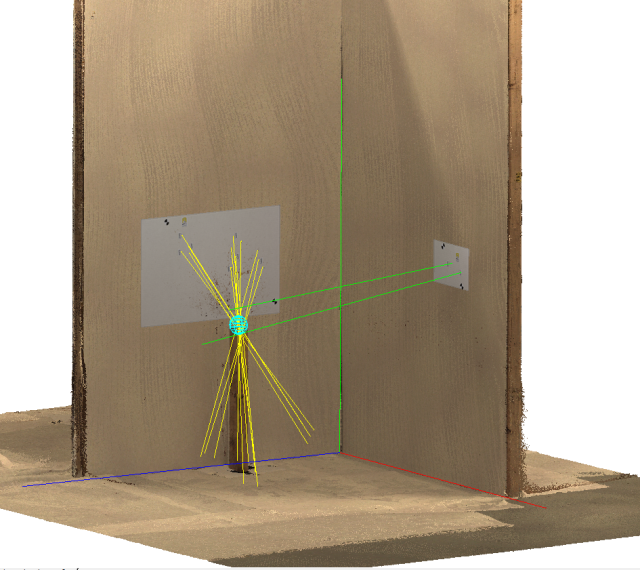
Function
Once the stains have been defined, their trajectory lines will converge in 3D space. This 3D convergence is the Area of Origin. A user can select stains to include in the analysis and sphere or point can be drawn as a representation. The sphere size can be adjusted by the user and is independent from the results. The results will be provided and the user can choose an origin to reference the convergence location. The XYZ directions are defined by the coordinate system chosen at the start of the workflow.
Procedure
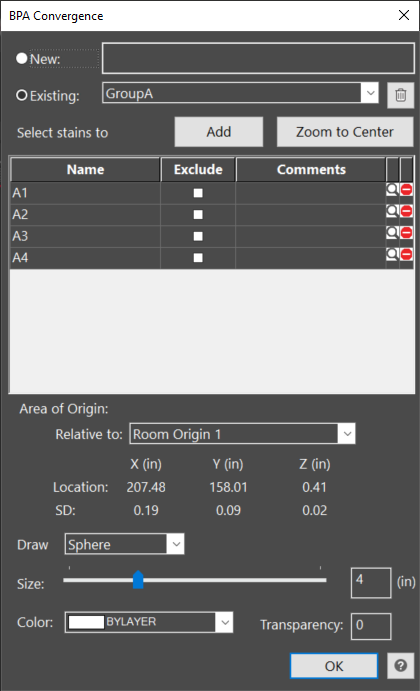
The user can define a new convergence sphere or select an existing from the list to make changes.
The user will select the Add button to include stains in the analysis. Additional stains can be added to an existing convergence.
Select the stain by clicking on them or window around a group of stains. The stains will be listed in the dialog and will appear dashed.
The user can edit the stain names, exclude a stain from the analysis by checking the box, and add a comment regarding that stain. If the stain is excluded, it will remain in the dialog and show up in the report with the checked box and comment. The results will update automatically.
To remove a stain from the analysis and clear it out of the convergence dialog and report, the user can select the remove button at the end of the row.
The magnifying icon allows a user to zoom in and highlight a selected trajectory line.
Zoom to Center will zoom in on the current convergence.
An existing convergence can be selected and deleted from the garbage can icon.
Area of Origin
The location of the area of origin will be provided as the X, Y, and Z distance from the reference origin selected. The standard deviation (SD) is also provided for the X, Y, and Z. The XYZ directions indicate the distances along the wall, up the wall, and away from the wall and are be based on the selected coordinate system at the start of the workflow.
By default the area of origin will be represented by a sphere. The user can change this to a point or choose to not show a representation and use the trajectory lines to visualize the convergence.
The size of the sphere or point can be adjusted with the slider or by typing in a value in the input box. The color can also be changed and the transparency can be adjusted by typing in a value (0-100 where 100 is fully transparent).
All changes update the results automatically.