Function
The crush analysis tool calculates the damage energy associated with the crush measurements and the equivalent barrier speed/velocity (EBS/EBV) the vehicle experienced during the crushing.
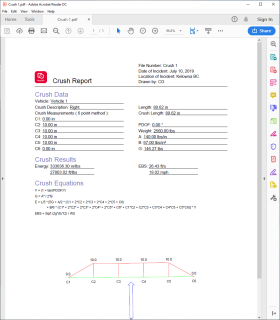
This crush tool uses the 2points/4points/6points crush calculation method allowing a user to input the 2, 4, or 6 crush measurements that are equally spaced across the damage width. The stiffness values, vehicle weight, principle direction of force (PDOF), length, and crush length will also be input by the user. The Energy and EBS will be calculated and the results will be displayed on the dialog. A report can be generated for the user that contains the input values, the calculated results, the equations used and the crush profile.
The crush tool can be used with measurement data, an image, symbol, or point cloud.
Procedure
Select the crush analysis button and click in the drawing for the C1 then C6 location. The crush tool will appear in the drawing area and the dialog will open. The distance between the measurements C1-C6 is equal.
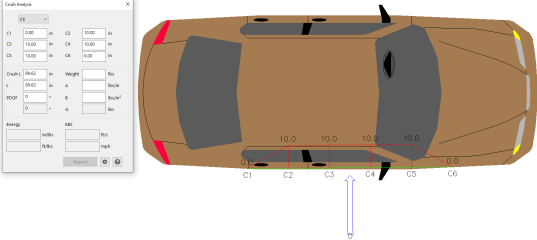
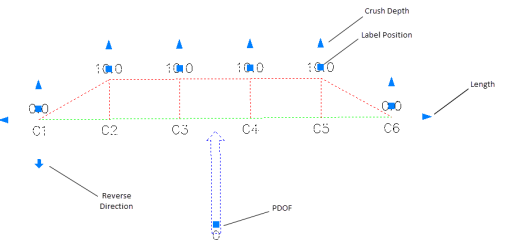
Select the crush tool and the grips will appear. The grips can be used to adjust the crush depth, length, pdof, direction, and placement of the measurement text. As the grips are adjusted, the values update in the dialog.
From the dialog, the user can switch to a C2/C4/C6 method. The values can also be typed in the dialog and the adjustments will automatically show in the drawing.
The crush length is the distance between C1 and C6, which is the physical width of damage observed on the vehicle. Length is the value used in the calculation. It is generally equal to the crush length if the direct and induced damaged does not extend across the entire end or side of the vehicle.
The weight can be obtained from the vehicle specs database found in the scene analysis. The occupants and cargo weight can also be included in this weight.
The stiffness coefficients, A and B, can be obtained from user calculations or derived from published data. The G value for the calculation uses A and B and will fill automatically.
Once the crush parameters are input, the results will be displayed.
The following formulas are used in the crush analysis tool:
Y = (1 + tan(PDOF)²)
G = A² / 2*B
E = L/5 * [5G + A/2 * (C1 + 2C2 + 2C3 + 2C4 + 2C5 + C6) + B/6 * (C1² + 2C2² + 2C3² + 2C4² + 2C5² + C6² + C1C2 + C2C3 + C3C4 + C4C5 + C5*C6)] * Y
EBS = Sqrt (2g*(E/12) / Wt)
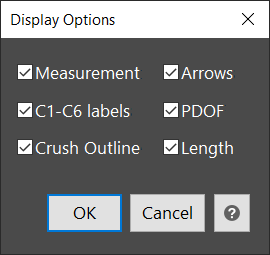
The settings button on the dialog allows the display options to be adjusted. Each part of the crush tool can be displayed or turned off. The elements that are checked will display in the report.
The user can generate a crush report by selecting Report and a secondary dialog will appear to enter details for the report. The report will include the inputs, results and calculations if chosen.
The Attach Files button allows the user to attach files such as images or pdfs to the back of the crush report.