Function
The origin is used to reference the location of the stains and the area of origin. A user can define one room origin or multiple origins if there are multiple patters within a room. An origin must be set for the room prior to defining surfaces for the BPA analysis.
Procedure
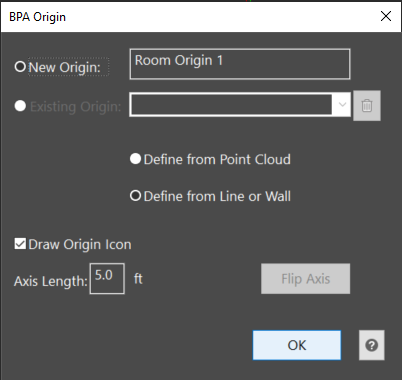
The origin dialog allows a user to create new origins or make changes to an existing origin. A name is provided for the origin but this name can be changed by the user prior to defining the origin. An origin can be defined from a point cloud or from a drawn line or wall. The user will select the radio button for the method appropriate for their scene and selecting the OK button will start the picking process.
Point Cloud (only available if point cloud exists in drawing)
To define an origin with the point cloud, the user must pick a point on the front wall, left wall, and floor. The planes will be identified and the intersecting point between the three planes will be defined as the origin. A user can hit Enter to skip picking the left and/or floor planes and instead just pick a point for the origin.
By picking points on the walls, the front wall, left wall, and floor surfaces are automatically created.
Line or Wall
An origin can be defined by picking on a drawn line or wall. The UCS icon will be placed at the start of the line.
Select an the existing origin from the list to make changes.The garbage can icon will delete the origin. A user can uncheck draw origin icon to hide the axis lines. The length of the axis lines can be changed and the axis can be flipped. To close the dialog, the user can select Ok or the X in the top corner.