Function
Simply place the momentum angle tool in the scene and use the intuitive grips or the properties to determine the approach and departure angles of the vehicles involved in a collision.
Procedure
The user will be prompted to pick points in the drawing to define the approach and departure angles for Vehicle 1 and Vehicle 2. The approach angle of Vehicle 1 is defined as 0 degrees and this is the reference angle. The other angles are relative to the V1 approach angle.
Pick the center of gravity for Vehicle 1 pre-impact and the direction of approach.
Pick the center of gravity for Vehicle 2 pre-impact and the direction of approach.
Pick two points for the post-impact trajectory of Vehicle 1.
Pick two points for the post-impact trajectory of Vehicle 2.
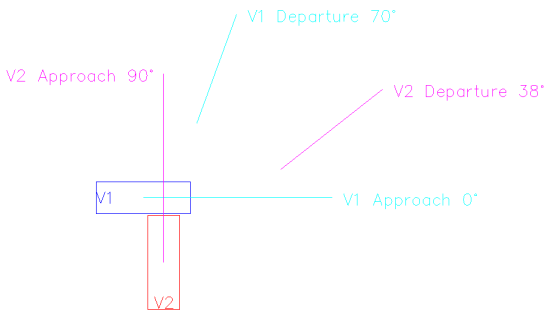
The momentum angle tool has two vehicle outlines representing the initial positions of V1 and V2. As the approach lines are rotated, the vehicle outlines will rotate as well so they are always pointing in the direction of travel. These vehicle outlines are for a visualization and can be turned off from the properties panel.
Each line is labeled with the relative angle, rounded to the nearest degree. The label will update dynamically as the angle is adjusted. The labels can be turned off from the properties panel.
Once drawn, the user can select the tool to make changes using the grips or from the properties panel.