Function
This routine allows a user to define the horizontal (azimuth) and vertical (elevation) angles of a trajectory based on a reference plane. These angles will be saved for each trajectory and included in the Bullet Path Reconstruction Report.
Procedure
Once trajectories are defined in the scene, the horizontal and vertical angles can be determined.
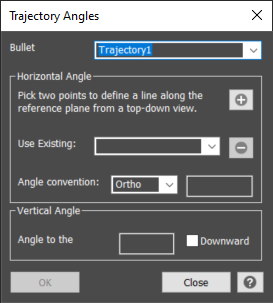
The trajectory analysis dialog is populated with all existing trajectories. First select the trajectory to be analyzed from the list.
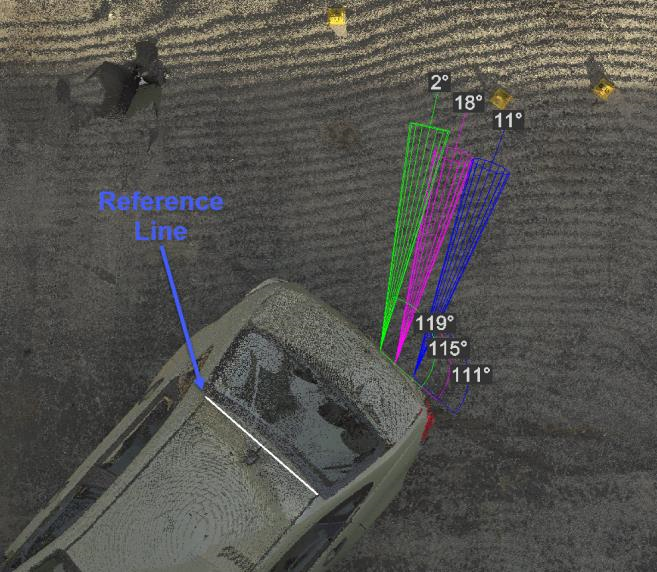
To determine the horizontal angle, a reference plane needs to be defined. The user will press the Plus button and provide a name for the reference. The drawing will switch to a top down view allowing the user to pick two points that define a line. For example, a user could choose to draw a straight line across the back of a truck for the tailgate impacts, the front of the car for the hood impacts, or along a wall for impacts into that wall.
A reference can be used for all trajectories or multiple references with a unique name can be defined for the drawing. An existing plane can also be deleted with the minus icon.
The horizontal angle is the angle between the selected reference line and the center line of the selected bullet trajectory. The horizontal angle will be displayed automatically when a trajectory and reference are selected. Ortho is the default angle convention, but NATO is an option as well. Ortho: 0 to 180 degrees, with 0 being on the left if looking at the impact surface straight on. NATO: -90 to +90 degrees, with -90 on the left and +90 on the right when looking at the impact surface.
The vertical angle is the angle to the horizon or parallel to the ground from 0 to 90 degrees. The angle will be displayed automatically when a trajectory is selected. The approaching trajectory is considered positive or upward when approaching from low to high and it is considered negative or downward when approaching from high to low. The user can optionally check the downward box to put a negative in front of the vertical angle, indicating a downward trajectory . If the box is not checked, it is an upward trajectory.
These angles are read-only and can not be manually entered/changed from the dialog.
The Ok button will draw the angle labels in the drawing as part of the trajectory cone. These lables are dynamic and will always face the viewer.
The user can continue analyzing the remaining trajectories by selecting the next from the list or press the Close button to close the dialog.