
Summary
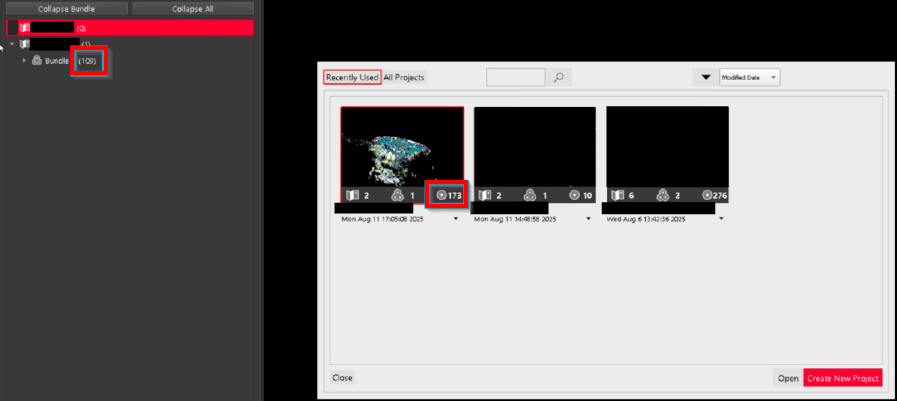
Sometimes, Setups may disappear from the Explorer panel after being moved between SiteMaps. Consequently, the number of Setups shown in the Project Explorer thumbnail exceeds the number shown in the Explorer panel.
Workaround
To restore missing Setups, Cyclone REGISTER 360 PLUS has to be started via a specific shortcut that has been configured to activate the extended functionality of the Repair tool. After running the Repair command, any orphaned Setups will be restored to a newly created SiteMap.
Note: Ensure to make a backup of the project beforehand.
See the instructions below for the full step‑by‑step workflow:
-
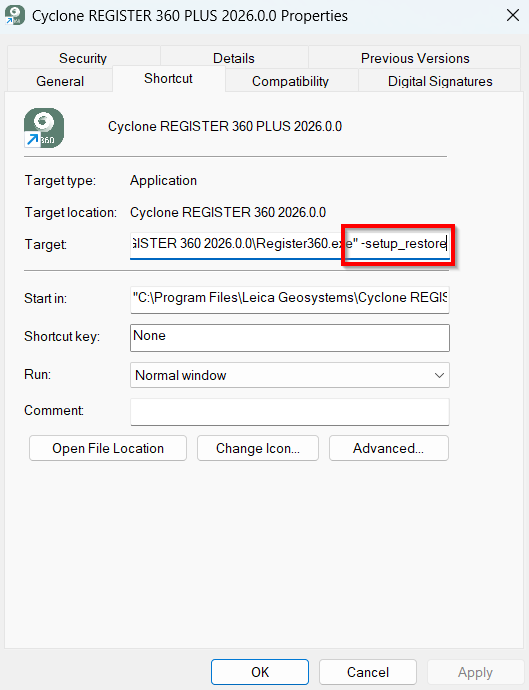
Right-click the shortcut for Cyclone REGISTER 360 PLUS 2026.0.0 on the desktop and select Properties (admin rights required).
-
Add
-setup_restoreto the Target field entry, separated by a space as shown below:
-
Start Cyclone REGISTER 360 PLUS via this shortcut.
-
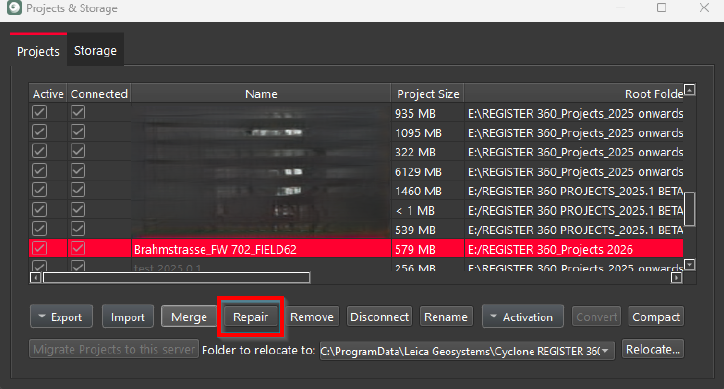
Navigate to Project & Storage, select the affected project, and click Repair.
-
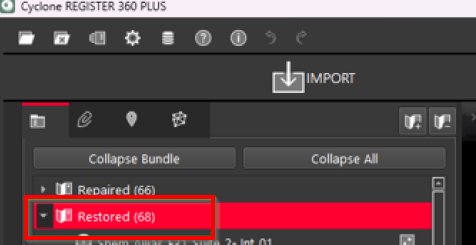
Cyclone REGISTER 360 PLUS will detect and restore any orphaned Setups into the Restored SiteMap.
-
Verify that the missing Setups have been restored.