
New features
Switch between the coordinate systems in your asset
Your assets now open with every User Coordinate System they carry available to you, not just the one marked active — so you can read coordinates in the frame your task calls for without re-uploading the data under a different setup. The selector sits next to the view cube, above the navigation modes icons.
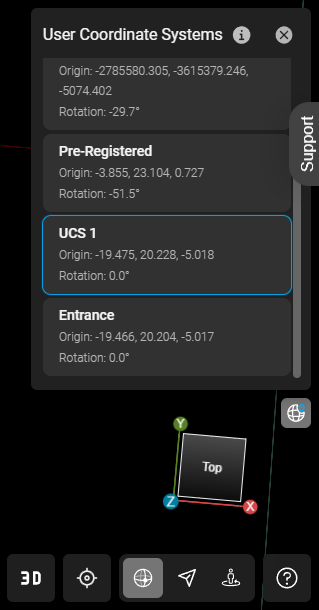
Pick a UCS from the list and every coordinate-dependent view follows at once: coordinate readouts (measurements, GeoTags), the grid, the view cube, SiteMap, Panorama orientation, limit boxes, and tours — no reload, and no leaving the asset. Switching works in Panorama mode too. Your choice is remembered per asset in the browser you're using, and the asset default stays selected until you pick something else.
See Switching between User Coordinate Systems for the full list of views that follow your selection.
Selecting a UCS changes only what you see. The asset's active UCS, its metadata, and your stored measurement and GeoTag data are untouched. UCSs are defined upstream when the data is registered; GeoCloud lists what the asset carries.
Bug fixes
-
Assets still processing no longer look broken - Previously, assets that had finished uploading but were still being processed showed a red error marker in a scene's asset library, so they looked like they had failed. They now show as still loading.
-
Usage reports for accounts outside the EU - Previously, usage report downloads could hang and never complete for accounts hosted outside the EU region. Reports now generate correctly in all regions.