

What’s New
This is a major release of Cyclone REGISTER 360 PLUS that provides support for the new generation of RTC scanners, including RTC300, RTC500, and RTC700. It also includes multiple bug fixes and additional enhancements to increase system performance and stability.
Support for RTC300, RTC500, and RTC700 Scanners
Cyclone REGISTER 360 PLUS now supports the new generation of RTC scanners, including RTC300, RTC500, and RTC700.
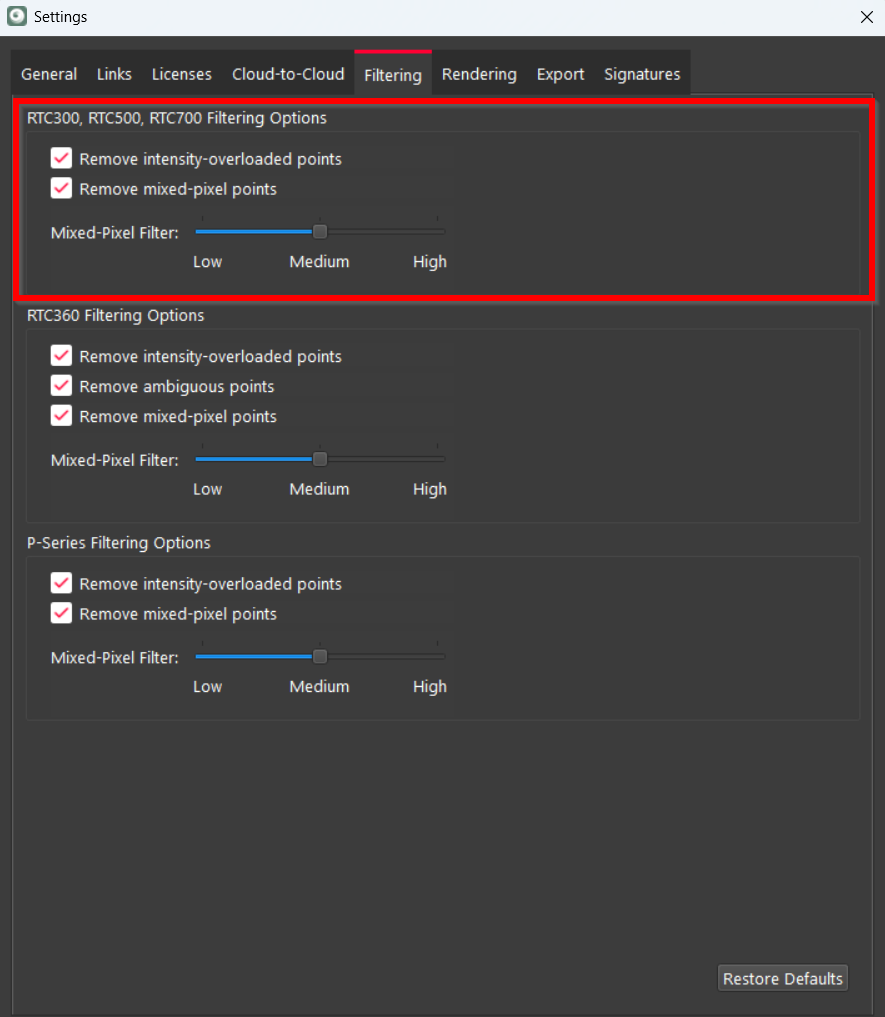
Extended Filtering Settings for RTC Scanners
The Filtering settings have been expanded to include filtering options for RTC300, RTC500, and RTC700 scanners. They enable users to control point cloud cleanup and improve scan quality by removing intensity-overloaded and mixed-pixel points during data import and processing.
Supported Import Methods
Cyclone REGISTER 360 PLUS supports several workflows for importing data from RTC300, RTC500, and RTC700 scanners:
-
Importing data, previously downloaded via a USB dongle, from the local disk
A scanner Job can be imported directly into Cyclone REGISTER 360 PLUS by dragging and dropping the Job folder into the Import area. For more information, see the Importing Data From Local Disk Help page.
Cyclone REGISTER 360 PLUS 2026.1.0 fully supports this import method, making it the most reliable way to achieve optimal results.
-
Importing data from Cyclone FIELD 360
Project data can be imported from Cyclone FIELD 360 using either a direct tablet connection or the FAFx project exchange file. For more information, see the Importing Data From Cyclone FIELD 360 Help page.
This import method has some limitations in Cyclone REGISTER 360 PLUS 2026.1.0. For details, see RTC300/500/700 Issues.
Both workflows allow transferring preview data, full-resolution scans, and Control Points from the field into Cyclone REGISTER 360 PLUS for registration and further processing.
Managing Embedded Control Points in RTC300 / RTC500 / RTC700 Scanner Jobs
Jobs created by RTC300, RTC500, and RTC700 scanners may contain embedded Control Points. Unlike workflows used with some previous scanner generations, Control Point information is stored directly inside the scanner Job itself. Therefore, when importing a Job that contains Control Points, Cyclone REGISTER 360 PLUS automatically imports the Control Point data together with the Job. No separate TXT file import is required.
For more information, see the Working with Embedded Control Points Help page.
LWPO FAFx Support
Starting with this version, Cyclone REGISTER 360 PLUS supports importing FAFx files that contain Light Weight Preview Object (LWPO) data from RTC300, RTC500, and RTC700 scanners.
FAFx (FIELD 360 Backup/Archive File Format) Import Compatibility
|
|
Сyclone FIELD 360 |
Cyclone REGISTER 360 PLUS |
||
|
Device / Scanner |
FAFx LWPO Data Availability |
FAFx Full Data Availability |
Import to Cyclone REGISTER 360 PLUS |
Notes |
|
RTC300 / RTC500 / RTC700 |
✅ optional |
✅ optional |
✅ FAFx LWPO data import supported
|
Supported starting with Cyclone REGISTER 360 PLUS 2026.1.0 full version and Cyclone FIELD 360 v. 7.0 |
|
RTC360 |
✅ LWPO only |
❌ |
❌ FAFx LWPO data import not supported |
RTC360 data imports from USB |
|
P‑series (Pxx) |
✅ LWPO only |
❌ |
❌ FAFx LWPO data import not supported |
LWPO‑only exports are not supported in Cyclone REGISTER 360 PLUS full version |
|
BLK360/BLK360 SE |
✅ optional |
✅ optional |
✅ FAFx full data import supported
|
Only full‑data FAFx is compatible with Cyclone REGISTER 360 PLUS family |
|
BLK360 G1 |
❌ |
✅ Full data only |
✅ FAFx full data import supported |
Fully supported with Cyclone REGISTER 360 PLUS family |
|
BLK2GO (kinematic) |
✅ optional |
✅ optional |
❌ FAFx LWPO and full data import not supported |
FAFx BLK2GO data is not supported in Cyclone REGISTER 360 PLUS family |
|
BLK ARC (kinematic) |
✅ optional |
✅ optional |
❌ FAFx LWPO and full data import not supported |
FAFx BLK ARC data is not supported in Cyclone REGISTER 360 PLUS family |
Improved Fence Delete and Restore Performance
Fence deletion and restoration workflows have been significantly improved to deliver faster response times across projects of all sizes. For smaller projects with up to 50 Setups, the speed improvement can reach up to 90% depending on the workstation. For larger projects with more than 50 Setups, the speed improvement can be up to 30–60%, depending on point cloud density.
Enhanced Target Matching During and After Import
Target matching has been improved by prioritising the creation of links with matching targets before adding Cloud-to-Cloud constraints. As a result, the speed of forming target links is up to 85% faster due to improved link criteria performance combined with better link colour adherence.
Bug Fixes
-
Fixed an issue where Cyclone REGISTER 360 PLUS showed an error and closed unexpectedly when navigating to settings.
-
Fixed an issue where renaming Setups after importing P40 data caused the application to become temporarily unresponsive and display an error, even though the operation succeeded. Now, renaming Setups completes as expected.
-
Fixed an issue where renaming BLK2GO walks included in a Bundle caused Cyclone REGISTER 360 PLUS to terminate unexpectedly.
-
Fixed an issue that caused Cyclone REGISTER 360 PLUS to become unresponsive when batch renaming more than 300 Setups in a dataset.
-
Fixed an issue that caused Cyclone REGISTER 360 PLUS to stop responding when detecting moving objects in datasets with more than 50 Setups.
-
Fixed an issue where creating a Finalized Registration with a point cloud from the reimported LGSx file caused Cyclone REGISTER 360 PLUS to stop responding and then close unexpectedly.
-
Fixed a performance issue that caused significant delays when publishing the project data to the LGSx file.
-
Fixed a performance issue that resulted in Bundle optimisation requiring more time in version 2025.0.1 than in previous versions.
-
Fixed a performance issue with the Find Smooth Surface tool that made it run slower than before. Now, smooth surface detection is improved compared to previous versions.
-
Fixed an issue that caused significant delays during the Finalize stage when attempting to publish a SiteMap with up to 20 Setups from a dataset with multiple SiteMaps. The finalization process now completes within a reasonable timeframe.
-
Fixed an issue where decimated point cloud exports, including unstructured E57, LGSx, and RCP Cloud formats, could not be completed successfully, resulting in the process to hang or terminate without generating an output file. Now, exports of decimated point clouds with decimation values equal to or greater than 1 cm run reliably and produce the expected results within a reasonable time.
-
Fixed an issue where, after publishing a project to LGSx, a point cloud in the resulting file was inaccessible when viewed in TruView or opened in CloudWorx.
-
Fixed an issue that caused high registration errors when registering P40 DAC-levelled datasets with targets only while the Level condition was enabled for all Setups.
-
Fixed an issue where projects converted from older versions could fail to load on Japanese Windows installations, causing Cyclone REGISTER 360 PLUS to close. Now, the converted projects open successfully across supported OS languages, including Japanese environments.
-
Fixed an issue where the E57 file, containing a dataset captured with a Trimble scanner, could not be imported into Cyclone REGISTER 360 PLUS.
-
Fixed an issue that prevented the import of dynamic (mobile) BLK ARC scan data into Cyclone REGISTER 360 PLUS.
-
Fixed an issue where, during RTC360 data import with automatic outdoor classification enabled, Cyclone REGISTER 360 PLUS incorrectly applied the indoor classification model when the system language was set to German. Cyclone REGISTER 360 PLUS now correctly applies the outdoor classification model for outdoor projects, regardless of the chosen language.
-
Fixed an issue where classifying points within a fenced area of the current SiteMap affected the classification of Setups from the same Bundle placed on another SiteMap, even if those points were not visible due to the Show only Setups from SiteMap in Bundle view rendering setting being enabled.
-
Fixed an issue where Setups hidden before Bundle classification were not recognised as Never Classified after being unhidden and instead displayed in black and white.
-
Fixed an issue that caused sphere target fitting to fail in most cases, even if detail scans were available. Now, when point density is sufficient, sphere targets fit consistently.
-
Fixed an issue that caused target matching to fail when Setups were imported with a significant tilt difference.
-
Fixed an issue where Cyclone REGISTER 360 PLUS did not constrain sphere target fitting to the target diameter specified in settings, causing reduced alignment accuracy and inconsistent results compared to Cyclone CORE for identical datasets. Now, Cyclone REGISTER 360 PLUS uses the user-defined diameter for sphere target fitting, ensuring feature parity with Cyclone CORE and providing consistent, accurate alignment results.
-
Fixed an issue where sphere target visualisation incorrectly changed from a sphere to a vertex after linking Setups.
-
Fixed an issue where changing the height of a sphere target also changed the sphere’s diameter. Now, editing a sphere target’s height no longer affects its diameter.
-
Fixed an issue where Cyclone REGISTER 360 PLUS sometimes incorrectly identified a sphere target as a black-and-white target.
-
Fixed an issue where target error values were reported incorrectly after a target was marked as Not Used and excluded from the registration report by disabling the Include unused targets option. Now, unused targets are properly removed from the report, and the remaining targets retain correctly associated error values.
-
Fixed an issue where running the Optimize with Targets Only command, after matching targets for link creation, caused the targets to be rematched incorrectly, and the Max target error and link creation criteria were ignored.
-
Fixed an issue where Target Height information from BLK360 G1 data was not preserved during FAFx import. Target Height values are now correctly imported and available in Cyclone REGISTER 360 PLUS after the import process.
-
Fixed an issue where hiding a specific Setup and then switching to the Setup Cloud view caused Cyclone REGISTER 360 PLUS to display a point cloud from a different Setup. Now, when the point cloud of the current Setup is hidden, the view correctly reflects its hidden state.
-
Fixed an issue where deleted points reappeared in the Bundle Cloud view after using the Find Smooth Surface tool and opening the Classification Manager. Now, deleted points remain hidden, and the view refreshes correctly without requiring a project reload or view change.
-
Fixed an issue that caused a point cloud to include deleted points in exported E57 (structured) files after upgrading the project, created in version 2023.0.1, to the latest version and generating a new deliverable with the Export cleaned point cloud for E57 (structured), PTG, PTX, and RCP (Setups) formats export option enabled. Now, structured E57 exports correctly respect all previously applied cleaning operations.
-
Fixed an issue where previously deleted Cloud-to-Cloud points were unintentionally restored when detecting moving objects.
-
Fixed an issue where exported LGSx files did not include panoramic images for associated tracks when using mobile data processed in Pegasus OFFICE.
-
Fixed an issue that prevented panoramic images from exporting at the Report stage if any Setup name included a period. The application now displays a clear error message if unsupported characters are used in Setup names.
-
Fixed an issue where duplicate Setup names within the same project caused pano image export failures. Cyclone REGISTER 360 PLUS now prevents duplicate Setup names and notifies users when a duplicate is detected, ensuring successful and error-free exports.
-
Fixed an issue that caused exported LGSx files to include original scanner images already stored in the Image Archive folder, which increased file sizes.
-
Fixed an issue where the
setupinfo.csvfile generated during panoramic image export contained incorrect Setup names, showing original names instead of the updated ones. -
Fixed an issue that prevented a panoramic image from being displayed in the Setup Cloud view in projects where BLK2GO data was linked with RTC360 data.
-
Fixed an issue where a Home Setup or a Setup with a level condition did not retain its level when connected to the entire Bundle at once.
-
Fixed an issue where SiteMaps appeared in a different order after creating a Finalized Registration, not matching the order shown during the Review and Optimize stage.
-
Fixed a minor issue that blocked multi-selection for certain data type combinations in the Navigator panel, for example, when selecting BLK ARC WayPoints together with standard or BLK ARC static Setups. Now, these items can be selected together as expected.
-
Fixed an issue where the scale bar in orthoimages exported as DXF files appeared mirrored when opened in any CAD software.
-
Fixed an issue where activating the TruSlicer view in a SiteMap with widely spaced Bundles shifted the view to the center, causing the selected Bundle to disappear. The view now stays focused on the selected Bundle, eliminating the need for manual view adjustments.
-
Fixed an issue where the toolbar and SiteMap view flashed when viewing Pegasus data from an imported LGSx file.
Known Issues
Screen Resolution Issues
-
Cyclone REGISTER 360 PLUS does not support display resolutions beyond 4K.
Graphics Card Issues
-
Cyclone REGISTER 360 PLUS may not detect the dedicated graphics card on computers with multiple graphics cards. Users must manually set the dedicated card for use with Cyclone REGISTER 360 PLUS. It can be done in Windows Settings.
-
Some graphics card anomalies can be caused by power management software. Please turn it off by setting the power management profile to High Performance.
Data Handling and Memory Issues
-
Cyclone REGISTER 360 PLUS projects located on Network Attached Storage (NAS) drives are NOT supported.
-
Cyclone REGISTER 360 PLUS can experience data corruption, project loading failures, or unexpected data loss if projects are created, stored, or relocated to cloud-synced drives (for example, OneDrive, Google Drive, Dropbox), NAS, network drives, or shared folders. To ensure data integrity and optimal performance, projects should be stored on a local, internal drive.
If the user chooses to share, relocate, or back up Cyclone Register 360 PLUS project data to a network drive, NAS, or cloud-synced drive, the following workflow is recommended:
a. Using the Export option in the Project & Storage interface, export the project as a RAF file to a local drive.
b. Manually copy the exported RAF file to the desired network or cloud location.
-
If memory issues arise, check that the virtual memory size is set to the same size as RAM. For more information, refer to the dedicated Troubleshooting page.
-
Using Export to Separate Setups does not use the same level of temp space. Temp space is not generally a problem when exporting separate Setups.
-
Files written to the temp folder at C:\Users\(user name)\AppData\Local\Temp\Register360, will be deleted after the program closes. These files will NOT be deleted if the program freezes or crashes.
-
When Setups are moved between SiteMaps, some of them may not appear in the Explorer panel. As a result, the number of Setups shown in the Project Explorer thumbnail may exceed those displayed in the Explorer panel. For a workaround, refer to the dedicated Troubleshooting page.
Compatibility Issues
-
Some customers have reported that Cyclone REGISTER 360 PLUS stops running when using AMD Ryzen 7 processors.
Import Issues
-
The Import Images option might not work as expected if it is deselected before adding data to the import area, resulting in panoramic images still being imported into the project. The recommended workaround is to deselect the Import Images check box only after the data has been added to the import area.
-
In Cyclone REGISTER 360 PLUS 2026.1.0, the Auto B&W Target option does not work when importing FAFx data.
Export Issues
-
To publish a unified point cloud, ensure that the Create a point cloud during finalized registration option is selected to avoid incompatibility.
-
In rare cases, exporting structured data to RCP Setups with sub-sampling may result in some Setups being omitted from the final output. This occurs due to cloud editing where sub-sampling can reduce the points below the 500 x 500 minimum required by ReCap. Alternatively, it could be due to another limitation which can be worked around by either not using the sub-sampling, or separating the Setups onto multiple SiteMaps and exporting those SiteMaps separately. Make sure the data has Control applied for consistent coordinates between separate Finalized Registrations.
-
When exporting panoramic images of Setups using the Pano images option from Publish Options on the Report tab, the generated CSV and TXT files both contain the same position and orientation information, instead of providing Setup poses in the CSV file and pano image poses in the TXT file as expected.
-
Cyclone REGISTER 360 PLUS may stop responding when exporting a decimated unstructured point cloud (LGSx, RCP, E57) when using larger datasets and a decimation value set below 1 cm.
RTC300/500/700 Issues
-
When importing RTC700 datasets with the Import Images option turned off, panoramic images are generated and appear with a gridded pattern after import.
-
In some cases, panoramic images may appear highly pixelated after import.
-
After importing a dataset with detailed scans (USB workflow), some full-dome scans show only the detailed scan in Visual Alignment and Split View.
-
Importing RTC700 data via FAFx (LWPO or full data) or direct import workflows is not yet fully supported in Cyclone REGISTER 360 PLUS 2026.1.0. The following issues may occur:
-
Panorama misalignment
-
Import failures
-
Missing GeoTag categories
-
Recommendation: For best results in Cyclone REGISTER 360 PLUS 2026.1.0, import RTC700 data via the USB dongle workflow.
RTC360 Issues
-
Importing RTC360 data into Cyclone REGISTER 360 PLUS cannot be completed successfully if RTC360 data contains non-ASCII characters.
BLK360 Issues
-
When importing BLK360 data that includes GNSS information directly from the scanner into Cyclone REGISTER 360 PLUS, it fails to load a satellite map and does not zoom in on the approximate location indicated by the GPS information from the scanner.
-
When importing BLK360 data that includes GNSS information directly from the scanner into Cyclone REGISTER 360 PLUS, the Select Coordinate System import option on the Properties panel is disabled. To activate the option, in the import area, either click a specific job or select or deselect any previously selected job.
BLK ARC Issues
-
As of version 2024.0.1, importing BLK ARC data, which includes static scans and Cyclone FIELD 360 links, directly into Cyclone REGISTER 360 PLUS is not fully supported. This is because the image assets and static scans may not be fully imported. The recommended method for full data import is using BLK Data Manager 2025.0.1.
BLK2FLY Issues
-
The Advanced Colorizer import option does not work for B2G files captured with BLK2FLY. When selected, the import behaves the same as if the option were not selected. Therefore, using this option for such datasets is not recommended.
Visual Anomalies
-
After importing colourless scans with the enabled Auto B&W target option, thumbnails for the black-and-white targets appear invalid and display as blank or white after being extracted manually.
-
When a level condition is applied to Unified and LGSx Setups, the level condition icon does not update to reflect this change. To verify the level condition, use the Setup’s context menu.
Unexpected Closures and Failures
-
30 GB of temp space is needed for every billion points exported to a single RCP cloud. Otherwise, Cyclone REGISTER 360 PLUS may become unresponsive or close unexpectedly.
-
When attempting to assign an asset to a GeoTag, the operation silently fails if the asset is already attached to another GeoTag and the TXT file is empty.
Other Issues
-
When using the point cloud cleaning tools in Cyclone REGISTER 360 PLUS, artifacts may appear in the form of box-shaped, reduced-density point cloud anomalies. In some cases, the entire point cloud of one or more Setups may disappear from the view after cleaning.
As a workaround, right-click the affected Setup and select Restore Deleted Points to restore the missing data.
Deprecated Features
Leica Geosystems strives to provide support for the widest array of operating systems and file formats possible as is reasonable given current technologies and support from third-party partners.
With each release, we review our list of currently supported formats and operating systems in line with industry trends and announce product terminations.
Leica Geosystems may add or terminate support for a file format during any release. Obsolete operating systems will be supported for six months after their announced termination or the next major software release, whichever comes first. Server products will be supported in alignment with Leica’s Client License Manager (CLM) supported servers to guard users against incompatibility.
Cyclone REGISTER 360 2021:
-
Windows 7, 8, and 8.1 are no longer supported.
Cyclone REGISTER 360 PLUS 2023.0.1:
-
FARO raw scan files from the newest FARO scanners are not supported due to a lack of availability in the FARO SDK.
Cyclone REGISTER 360 PLUS 2023.0.0:
-
Publishing to TruView Local and JetStream Enterprise is no longer supported.
-
ZFC scanner data files are no longer supported due to a lack of updated supporting MS redistributables.
-
iStar Camera images are no longer supported due to the lack of updated supporting MS redistributables.
Cyclone REGISTER 360 PLUS 2023.0.3:
-
This release of Cyclone REGISTER 360 PLUS will only support MS redistributables supported by Microsoft.
Cyclone REGISTER 360 PLUS 2026.0.0:
-
Windows 10 is no longer supported.
Licenses
All users with valid CCP for either Cyclone REGISTER 360 or Cyclone REGISTER 360 PLUS or Cyclone REGISTER, or with CCP valid as late as 1 May 2026, can run this new version of Cyclone REGISTER 360 PLUS with no new license required.
All users with valid CCP for Cyclone REGISTER 360 (BLK Edition) or Cyclone REGISTER 360 PLUS (BLK Edition) or with CCP valid as late as 1 May 2026 can run this new version of Cyclone REGISTER 360 PLUS (BLK Edition) with no new license required.
Users do not need to migrate to a Cyclone REGISTER 360 PLUS or Cyclone REGISTER 360 PLUS (BLK Edition) license in order to run Cyclone REGISTER 360 PLUS if their CCP or subscription is valid.