
These tools allow greater flexibility in creating coordinate systems in the point cloud, which can be exported to all supported formats:
-
UCSs can be created in the Setup Cloud or Bundle Cloud view, enabling the user to leverage 3D point data during the UCS creation process.
-
The X or Y axis can be set by using a region grow plane or corner.
-
The user can assign coordinates to a pick point on the point cloud or by the vertex generated by the corner region grow.
Advanced UCS Workflow
The general workflow follows below. For more details on setting a UCS by Pick, Plane or Corner, please refer to:
General Workflow
-
Enter Setup Cloud or Bundle Cloud.
-
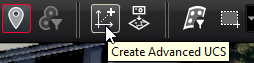
From the toolbar, click the Create Advanced UCS icon.
-
The Create Advanced UCS dialog will appear. Through this dialog, the user is guided through the UCS creation process to ensure that they achieve optimum results.
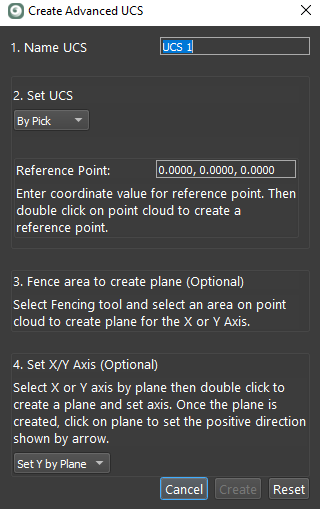
The new UCS creation dialog supports three main workflows for creating a UCS: