
This command detects the location of the minimum and maximum scalar attribute or inspection values of a cloud or a mesh. Moreover, it allows detecting iso gradient lines on an inspected mesh.
Requirements
Select one cloud with scalar attributes displayed or one inspected mesh and launch the command.
Inspected cloud
With a point cloud, the command computes min and max values of the scalar attribute.
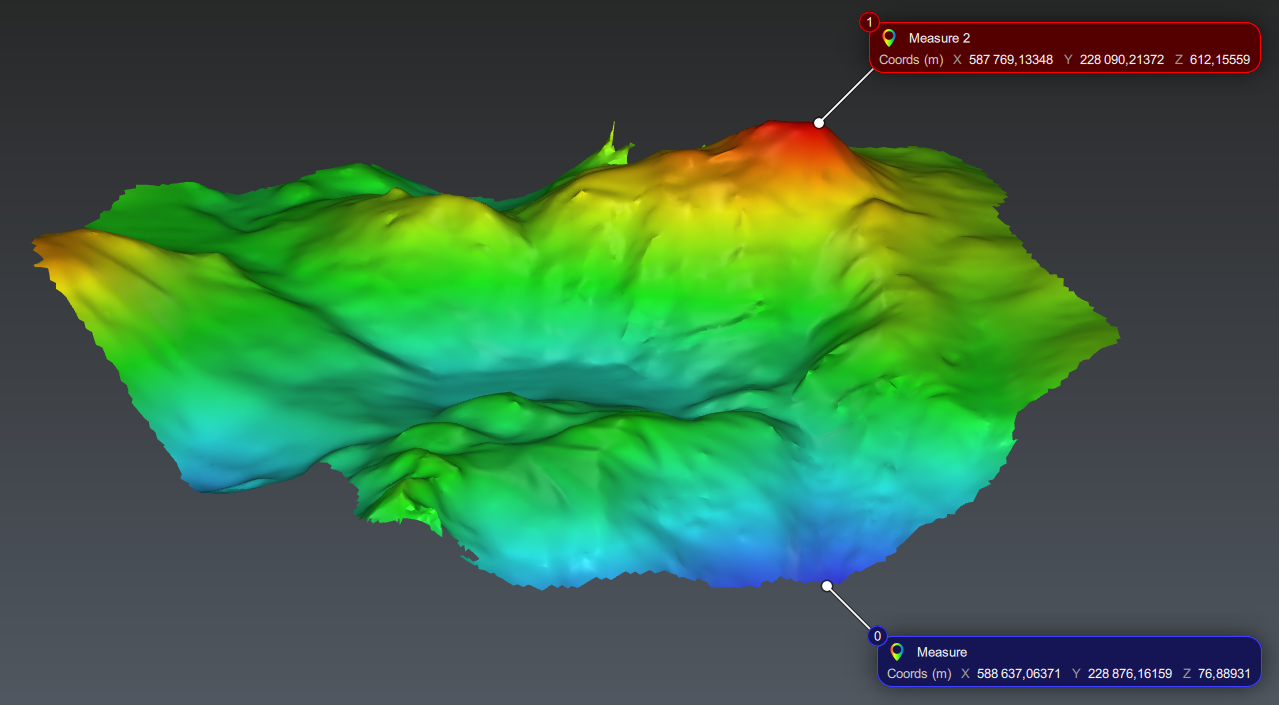
Display measures allows to add some measures on the extracted points.
Inspected mesh
With a mesh, the command computes either min and/or max values of the inspection, or iso gradient lines.
Min / Max: extracts min and/or max values of the inspection.
Regular: allows you to define a step between each isogradient line computed, for example, one section each 10m. Check Pass Through to force the section to pass through a given point. The starting and ending values are defined:
All over: between the minimum and the maximum values of the gradient.
Custom: in the range defined.
List of values: allows you to specify each individual threshold you want to extract. If your inspection contains steps, you can Load list from current intervals.
Extract the minimum and the maximum point (based on altitude in this case)
Notes
If there are several points/zones with the same min or max value, one point is created for each extremum point/zone.
On isolines, the base point of the measure is on the contour, without specific rule for the attachment point. The measure displays the deviation and, if the line is closed, the surface inside the line.