
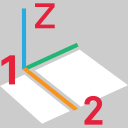
This command creates a new UCS and sets the orientation of the X-axis with 2 clicks.
Requirements
No selection is required to launch the command.
-
Click the first point according Define points: it will be the origin of the UCS.
-
Click the second point to define the orientation of the X-axis.
Notes
-
This will not change the orientation or direction of the Z-axis. The Z-axis will stay in the up direction.