Function
This lets you opt-in or out of the Map360 Analytics Program.
Participation in the Map360 Analytics Program helps Leica Geosystems understand how users work with Map360, and analyzing usage trends helps us better plan and prioritize future development projects.
Participation in the Map360 Analytics Program is optional; no personal data will be collected without your explicit consent.
Procedure
The Map360 Analytics Program dialog will appear in the following situations:
It will appear whenever you run the ANALYTICS command.
It will automatically appear the first time you launch Map360 and every time thereafter until you choose either "Yes, I agree to participate..." or "No, I do not agree to participate..."
It will automatically reappear after the specified period if you choose to temporarily opt-out by selecting "but please ask again in x days."
It will automatically reappear after installing a major or minor upgrade which contains changes to the Map360 Analytics Program.
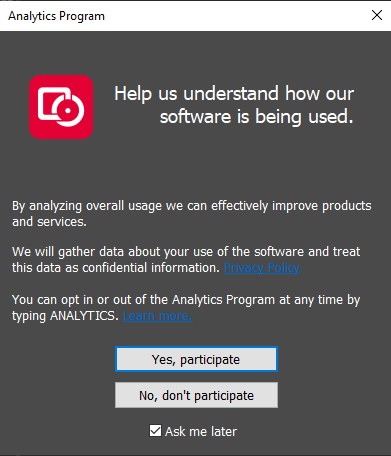
Pressing the "Review the Map360 Privacy Policy" button will launch your web browser to view the Privacy Policy, available online here:
Pressing the "Click here..." hyperlink will open the help file to this topic.
Selecting "Yes, I agree to participate..." or "No, I do not agree to participate..." will take immediate effect, and either start or stop collecting and submitting your usage data as detailed below.
Selecting "Yes..." or "No..." will take immediate effect, and either start or stop collecting and submitting your usage data as detailed below.
Selecting "but please ask again in 7 days" or "but please ask again in 7 days" will make your opt-out temporary, and you will be prompted again after the specified period.
Selecting "and please don't ask me again" will make your opt-out permanent, and you will not be automatically prompted again based on a specified period.
Cancelling, bypassing, or otherwise closing this dialog without selecting either "Yes..." or "No..." will cause it to retain your previous response (if applicable), or to prompt again on the next launch.
How it Works
When Map360 is launched, it will check whether or not you have previously agreed to participate in the Map360 Analytics Program. If you have neither agreed (opt-in) nor disagreed (opt-out), the above dialog will be displayed in order to request your explicit consent. There is no implied or assumed consent to participate.
If you do not agree to participate, the Map360 Analytics Program will only report that you have opted out and no personal data will be collected.
If you agree to participate, the Map360 Analytics Program will report that you have opted in and begin to collect certain data, including:
A unique identifier that corresponds to your system
Various information about your computer including operating system and hardware details
The geographic region where you are located
The name, edition, and version number of the Map360 product that you are using
The type of license that you are using (Standalone USB License Key, Network USB License Key, 30-Day Demonstration, Expired Demonstration, Not For Resale)
The serial number of the Standalone or Network USB License Key that you are using, if applicable
The command names that you use (MicroSurvey commands only, not IntelliCAD/AutoCAD commands or custom commands)
The drawing file formats that you use
As you use Map360, certain actions such as starting a command will cause a corresponding event to be recorded to a data file on your local drive, and the collected data will be periodically uploaded to our data processor. It is transmitted via a secure HTTPS connection. Once received, your data is anonymized via the removal of your IP address before being encrypted and securely stored.
If an internet connection is not currently available, the collected data will be cached for later upload to the data processor. The data cache will never exceed 1 MB.
Multiple eligible Map360 processes (icad.exe for MicroSurvey CAD, acad.exe for AutoCAD with MicroSurvey inCAD, or msembed.exe for MicroSurvey embeddedCAD) cannot participate concurrently (at the same time). If you do have multiple eligible processes running, only one can participate by collecting and submitting usage data and all others will not participate. Terminating the participating process will allow another to take over in its place.
How Your Data Will Be Used
Your data is controlled and protected by Leica Geosystems using a third-party data processor.
Your data is confidential and will not be provided in any way to any other third-party.
Your data may be analyzed by Leica Geosystems to gain insights and determine trends regarding how you and other users work with Map360. Analyzing usage trends helps us better plan and prioritize future development projects.
Your data may be used to provide targeted notifications or messages to you from Leica Geosystems, directly within Map360.