This guided workflow document introduces the surveying functionalities of the Leica RTC700, designed to support efficient, accurate, and user-friendly field operations. It provides step-by-step instructions for key georeferencing workflows, such as setup over known points, target scan, target-based registration, and area scanning, leveraging the tight integration between the scanner and Leica Field360. The goal is to help surveyors streamline data capture, ensure reliable positioning, and maximize productivity directly on site.
Workflows
Setup over a known point
The Setup over a known point workflow enables precise georeferencing directly in the field by positioning the RTC700 scanner over a point with known coordinates.
By entering or selecting the control point in Cyclone FIELD 360, the setup is aligned to the project coordinate system after acquisition, reducing the need for post-processing.
This approach:
Ensures immediate spatial accuracy
Supports consistent alignment across multiple setups
Is particularly suited for survey-driven projects with established control networks
The assignment can be defined:
During setup creation
Via the Assignments table
Target scan
The Target scan workflow enables accurate georeferencing by actively scanning and measuring targets within the scene.
With RTC700 and FIELD 360, users can perform:
Single target scan
Targets are picked in 360° or 3D view, measured, and assigned to known coordinates directly in the field
Single target scan
Batch target scan
Multiple targets are measured automatically in a single operation, reducing manual interaction and field time
Targets are managed in the Target Manager:
Initially appear in the Pendingtab after picking
Can be selected and measured in batch
After processing, move to the Review tab
Multi-Target Picking
In the Review stage, users can:
Inspect fitting results
Navigate to targets in the point cloud
Accept or reject targets as needed
This workflow separates target picking, measurement, and validation, improving efficiency while maintaining full control over data quality
Target to target link
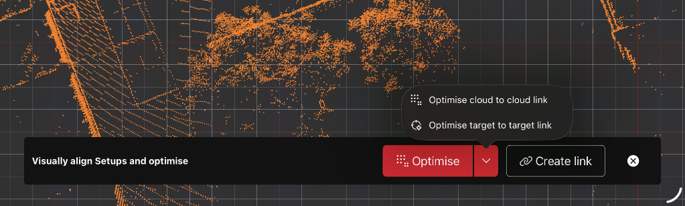
The Target-to-Target link workflow enables registration of multiple setups by linking shared targets across scan positions.
Once targets are measured and validated, FIELD 360 automatically links setups by matching identical target IDs. This creates a consistent geometric relationship between scans without requiring external control points.
This approach:
Supports incremental registration directly in the field
Provides robust alignment based on shared targets
Helps identify gaps or inconsistencies early in the workflow
Area Scan
The Area Scan workflow allows users to capture high-resolution data for selected regions of interest within a scene.
Using the panoramic view of the dual-dome scan, users can define a specific area and trigger a focused rescan with increased point density.
This enables:
Targeted data capture where higher detail is required
Reduced overall scan time and data volume
Efficient use of storage while preserving accuracy in critical areas
The high-resolution area is seamlessly integrated into the original scan and can be managed independently within the Data Browser.
Target fitting on mobile device with full data
Cyclone FIELD 360 now supports target fitting directly on the mobile device using full-resolution scan data.
Once full data is downloaded from the scanner, users can:
Perform target detection and fitting on-device
Validate results without additional scans
This capability is particularly relevant for RTC300 and RTC500 workflows, where dedicated target scans are not available.
By enabling target fitting on mobile:
Time on site can be reduced
Field workflows are streamlined
Results can be verified immediately
Target Fitting on Mobile Device
Target picking in Camera Image
Cyclone FIELD 360 now supports Target Picking in Camera Image.
This functionality improves the accuracy of target picking for distant targets that may be difficult to identify in the scanner's 360° panoramic view. By leveraging the scanner's high-resolution camera, users can precisely position the target crosshair before running the target fitting process.
The workflow starts in the 360° view, where the user roughly places the crosshair in the area of the target. By selecting Pick Target on image, FIELD 360 commands the scanner to orient its camera toward the selected location and capture a detailed image.
The captured image is then displayed in FIELD 360, allowing the user to navigate and zoom for a more precise placement of the crosshair directly on the target. Based on the scanner position and camera orientation, the system automatically estimates and displays the approximate distance to the selected target, helping the user verify the selection.
The user can overrule the system distance estimation, selecting a different range if needed by pushing the button correspondent to the desired rage.
Once the target has been accurately identified, the estimated position is used as input for the target scan and fitting algorithm, resulting in a more reliable and accurate target measurement, especially for targets located at long distances or in areas where the panoramic view lacks sufficient detail.
With this workflow Cyclone FIELD 360 enables:
Improved target selection accuracy for distant targets.
High-resolution camera view for enhanced visibility.
Automatic estimation and display of target distance.
More reliable target fitting results.
·Reduced risk of selecting incorrect targets in complex scenes.