
autocad pro bentley revit bricscad pro ultimate
Line-Tools | QuickSlice
Command Line
-
AutoCAD / BricsCAD: CWQSLICE
-
MicroStation: CloudWorx Sketch Qslice
CloudWorx includes a set of tools designed to set up a slice, place the Workplane (also UCS) on the slice's mid-plane, and then align the view to the slice. These tools are intended to prepare for Polyline Tools.
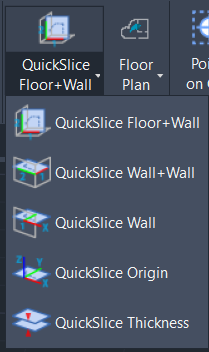
The QuickSlice tool includes the following options to create a slice:
-
Floor+Wall: It is used to define a vertical slice as a Workplane by picking both floor and wall points.
-
Wall+Wall: It is used to define a horizontal slice as a Workplane by picking two wall points.
-
Wall: It is used to define a horizontal slice as a Workplane by picking a wall point.
-
Origin: It is used to create a quick slice on the X and Y planes of the current UCS.
-
Thickness: It is used to change the slice thickness.