Autocad Pro Revit ultimate
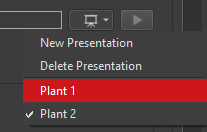
If there is more than one presentation present in a project, the user can change the active presentation by clicking the presentation drop-down menu 

Autocad Pro Revit ultimate
If there is more than one presentation present in a project, the user can change the active presentation by clicking the presentation drop-down menu