Sharing Assets is an integral component of collaborating within Hexagon GeoCloud.
Sharing can be done internally within your GeoCloud account community of users or externally.
Creating a sharing link
Click the Share button.
Determine whether the asset should be shared only with GeoCloud users of your account with approved access or the general public.
Click Copy link to copy the link to your clipboard to share via email, chat or other means.
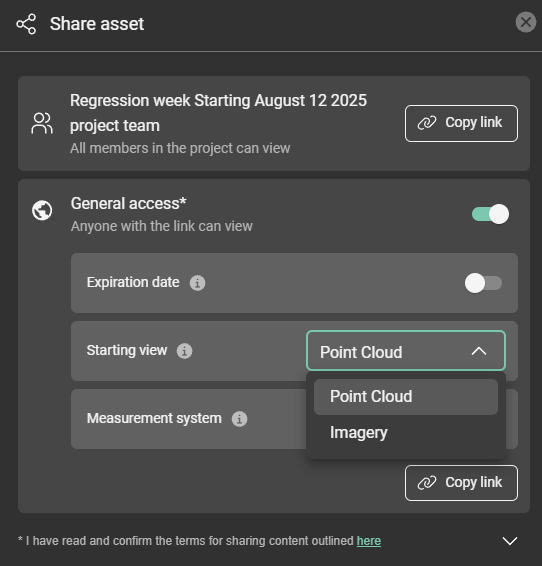
Share with Project Team
Using the project team option creates a link that can only be accessed by members of the GeoCloud account who have been granted access to the asset or project by an admin. If a non-user or user without access tries to access the link, they will not be able to view the asset.
General Access
General access creates a link that can be viewed by anyone online through a public URL. The asset must first be made public by switching the toggle on.
When sharing an asset for “General access”, it is possible to indicate the Starting view for the ones opening the link. Starting view options: Mesh, Imagery, Point Cloud.
Once public access is enabled, click Copy link to copy the public link to the clipboard for sharing via email, chat or other means.
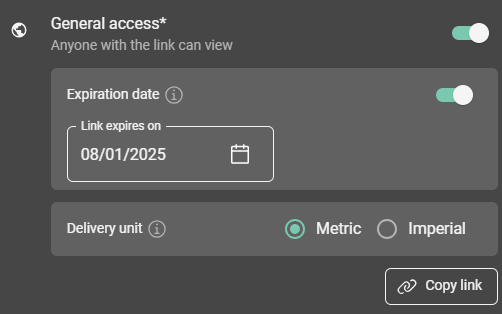
Set expiration date for a shared asset.
You can set an expiration date or revoke General access at any time by toggling it off.
Public link security
Each public link contains a unique, randomly generated key, so it can't be found or guessed by changing characters in the URL. Anyone who has the link can open the asset, so share it only with the people who need it. For sensitive data, set an expiration date or use Share with Project Team instead.
When you turn General access off and on again, or turn it back on after the link has expired, GeoCloud creates a new link and the old one stops working. Share the new link with anyone who still needs access.
Share an asset in a specific measurement system
When sharing an asset with General access, you can choose the measurement system it opens in. Recipients see the asset in the units you set, and can override them for themselves as described in Units of measurement.
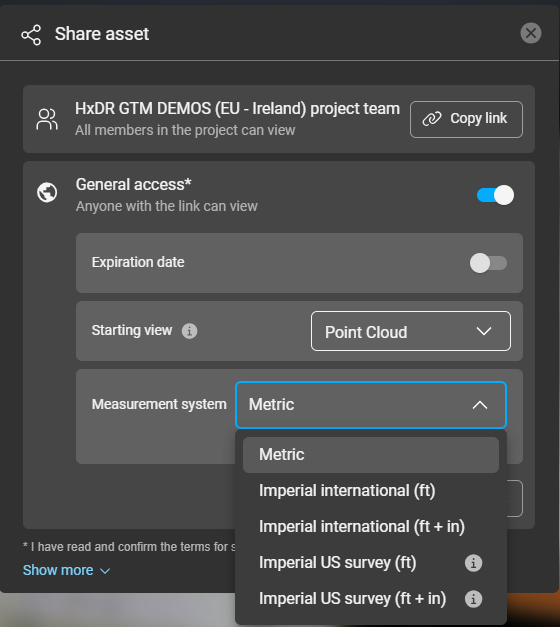
Measurement units on shared assets