An API user lets a third-party web application that embeds Hexagon GeoCloud connect to your company account, without using a person's login credentials.
API users are for integration partners. API users are intended only for third-party web applications that embed Hexagon GeoCloud.
Company admins can create a client ID and client secret for an API user directly in Hexagon GeoCloud. You enter these credentials in your integration partner's application, which then works with your GeoCloud data under the API user's permissions.
An API user behaves like any other user for permissions: it appears in the user list, can be given a company role and project roles, can be added to or removed from projects, and can be deleted, which immediately ends its access. Only company admins can create API users.
Creating an API user
Go to the User management page of your company account.
Click Create API user.
Read the security notice and click I agree.
Enter the details:
Name: a name for the API user, for example the name of the partner application.
Expiration date: up to one year from today.
Email address (optional): not used to sign in. It is only used for notification emails, such as being added to a project.
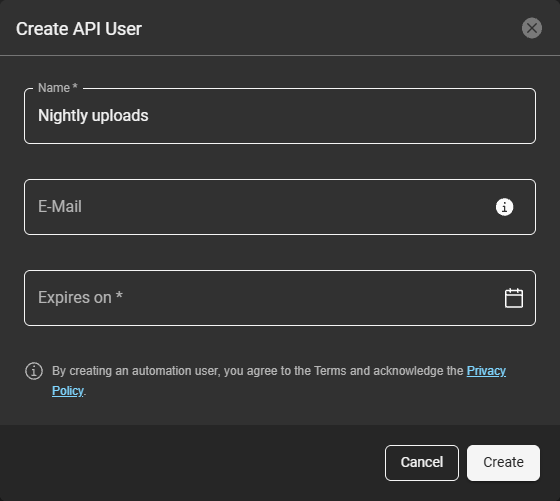
Create API User dialog
Click Create.
Copy the client ID with Copy ID and the client secret with Copy key, then click Done.
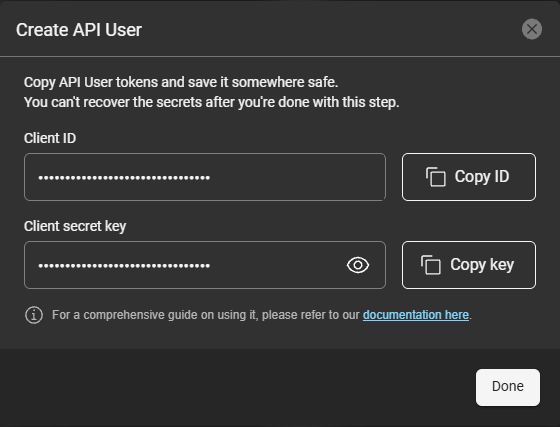
Client ID and client secret
The client secret is shown only once, when you create the API user. Store it somewhere safe and treat it like a password: anyone who has it can act as the API user. Enter it only in the integration partner's application it's meant for. If you think the credentials have been exposed, delete the API user straight away to end all access.
Managing an API user
An API user appears in your user list marked API User. Give it only the company role, projects and project roles it needs. Delete it when you no longer need it.
A clock icon next to the API user shows when its credentials expire. It turns orange 30 days before the expiration date and red once they have expired.

API user in the user list, credentials expiring within 30 days
Expiration and renewal
Credentials can't be renewed. Before they expire, create a new API user and enter the new client ID and client secret in your integration partner's application.
The credentials stop working within 24 hours after the expiration date. The API user stays in your user list until a company admin deletes it.
Uploads, downloads and processing done by an API user count towards your subscription quota, as they do for any other user.