
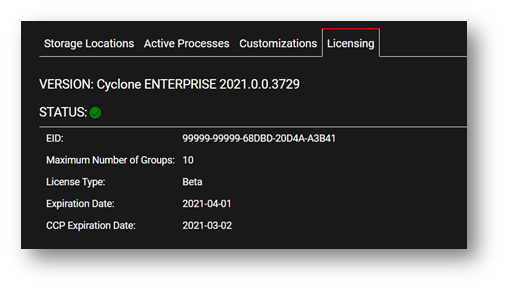
Users can find their Cyclone ENTERPRISE license information within the licensing dashboard Administration | Server | Licensing.
System Version
The Version field displays the currently installed version of Cyclone ENTERPRISE. This is useful when contacting Support to provide the current version. This is also accessible any time by clicking the Cyclone ENTERPRISE log in the top-left corner of the title menu bar.
License Status
The Status field shows if a license is valid (Green), expired (Red), or nearing its expiration date (Yellow).
License Details
Users can see the following details about their Cyclone ENTERPRISE license (Entitlement ID)::
-
EID
-
Maximum Number of Groups (including Sub-Groups) allowed
-
License Type (e.g., 1 Year Subscription or Permanent)
-
Expiration Date
-
CCP Expiration Date