Even if the measure does not need to be placed in a reference coordinate system, you may have to change the current coordinate system in order to make it coherent with the object. For example, on a facade, you may want to have the Z axis orthogonal to the wall.
Open the file BestFitOnRef.3dr (download).
This file contains two meshes: Theoretical Dam (bad CS) and Theoretical Dam (good CS).
Select and show only the mesh Theoretical Dam (bad CS) (you will probably need to type A to make a Zoom All).
Press X, Y or Z: you can see that the axes of the coordinate system are not coherent with the mesh.
Now select and show only the other mesh Theoretical Dam (good CS).
Press again X, Y or Z: now the axes are coherent.
Aligning the dam
Show only the mesh Theoretical Dam (bad CS), select it and go to Geometric Registration.
You must follow an order when using the command.
So first, click  and use the option Vertex End to place the Source point in the bottom left corner of the dam. A new dashed coordinate system will appear where you have clicked the point (see above). Keep (0, 0, 0) for Destination point as we want to have the bottom left corner of the dam as the origin of the new frame.
Then, change the Main axis direction. Choose Y, and click  to define the new Y axis. For example, use
  and click on the vertical face (1 in the image below). Then reverse the direction
  .
.
Finally, define the Second axis direction similarly by choosing Z and clicking on  . For example, use and click on the horizontal face (2 in the image below).
You can now click OK.
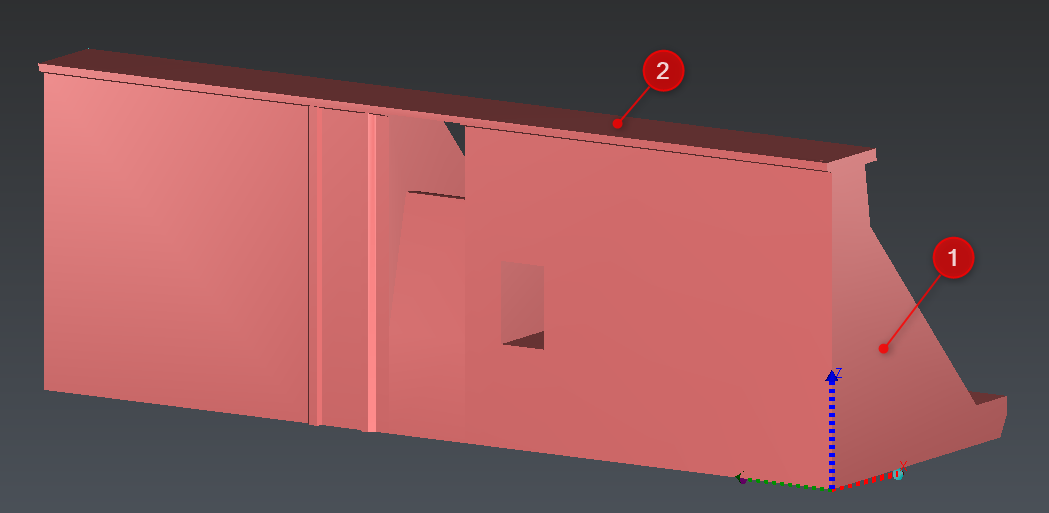
Expected result
Press A to do a zoom all, and then X, Y or Z on the keyboard. You will see that all the axes are now coherent with the model.
Important
When using Geometric Registration, the selected objects will be moved to the new position. The 3D coordinates of the object are updated. This command differs from Define UCS command.