revit
Set Level By | Point
This tool establishes a vertical height directly from the selected cloud point.
Using the Tool
To set a level at a specific point, follow the steps below:
-
Click the Point icon in the Set Level By panel.
-
Position the crosshairs over the selected point on the point cloud to define a level and click on it.
-
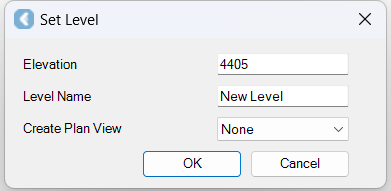
The Set Level dialog appears.
-
-
In the Set Level dialog, do the following:
-
Notice that the Elevation will be set from the pick point.
-
Enter the Level Name.
-
From the Create Plan View drop-down menu, select how to save the associated plan view in the Revit project browser.
-
Click OK, and the associated plan view will appear in the Revit project browser.
-