
To create a new Presentation open the snapshots tab, select the presentation dropdown then select, New Presentation.
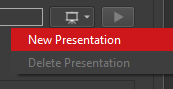
The Presentation will automatically be named with the name of your active Project. Edit the Presentation name by clicking on the name text.

Once you have created a Snapshot Presentation, the Take a Snapshot button will be activated.