Function
The SMAP command will draw linework by connecting points in accordance with a system of control coding which you include with your point descriptions. By recording field data using these control codes with your descriptions, you can have most of your linework drawn with the execution of a single command in Map360.
Procedure
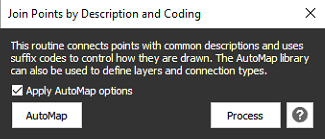
Process the linework to join points by common description and coding. The Apply AutoMap options is checked on by default. This will honor the AutoMap library options for layers and connection types. The Automap button launches the AutoMap Editor dialog to make necessary changes.
The following SDR control codes are available. More may be added in the future as per customer demand.
BOX3 - draws a box using 3 points. The first two points (in numerical order) define a side of the box. The third point defines the perpendicular width of the box. A description code is not required. Box3 is drawn in 3D and uses the AutoMAP layer and linetype settings.
CIR2 - draws a circle between 2 points, assuming the 2 points define the diameter of the circle. A description code is not required. The circle is drawn at a 3D point that is computed from the average of the elevation of the two points.
CAN2 - fits the part named "CAN2" between 2 points to represent a tree canopy, assuming the 2 points define the approximate diameter of the canopy. A description code is not required. The block is drawn at a 3D point that is computed from the average of the elevation of the two points.
ST or START - Start of a new joined line sequence. All points following, having the same description code will be connected with straight lines.
CLOSE or CLS - draws a line closing a line sequence from the current point back to the first point in the series of points having the same description code.
STCV - Start of a non-tangential curve or curve sequence. This will draw a curved polyline through all following points having the same description until reaching an EC control code. Note: curve sequences are drawn as 2D polylines so you can apply smoothing to the curve.
EC - End of curve, non-tangential to the immediately following line.
PC - Start of a tangential curve. This will draw a curve or curve sequence, beginning tangential to the immediately preceding straight line. The program will look for the nearest (by point number) preceding point having the same description code and use this to define the preceding tangent. If the PC is immediately followed by a PT code, the solution will consist of an arc and a tangent. If the PC is not immediately followed by a PT code, the solution will consist of a curved polyline.
PT - End of curve, tangential to the immediately following straight line. The program will look for the nearest (by point number) following point having the same description code and use this to define the following tangent.
JP - This option will draw a straight line to the immediately preceding point, regardless of description.
JN - This option will draw a straight line to the immediately following point, regardless of description.
Notes:
SDR linework will honor AutoMAP settings for Layer and Linetype. Lines will be drawn in 3D and polylines will be drawn in 2D. The purpose for this is to allow polylines to be curve or spline fit. At this point, only 2D polylines may be curve or spline fit. This may be expanded upon in future releases to provide additional control over 2D and 3D.
SDR codes may be stacked on one point only the immediately preceding description will be affected by the control code.
Ex1: CB CURB1 ST - In this case, the ST code will be applied to CURB1 but not to CB.
Ex2: EP1 EC CURB2 STCV - In this case, the EC code will be applied to EP1 and STCV will be applied to CURB2.