Date published: 15 September 2026
What’s new
1. Status LED Control
Users can now switch the RTC series laser scanner status LED on or off. This enhancement provides greater flexibility for operation in environments where visible status light is restricted or not permitted, such as certain railway and industrial applications.
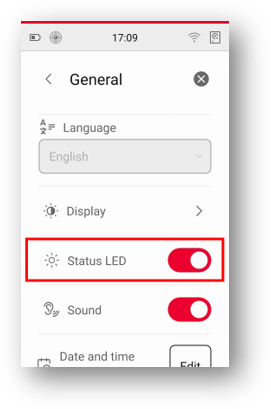
Figure 1: Status LED switch in general settings.
Improvements
1. Additional User Interface Languages
The RTC series laser scanner user interface is now available in additional languages, enabling users to operate the scanner in their preferred language.
Available languages: Danish, German, Spanish, Finnish, French, Hungarian, Italian, Japanese, Korean, Dutch, Norwegian, Polish, Swedish, Simplified Chinese, Traditional Chinese, Czech and Ukrainian. Language files can be downloaded from myWorld Customer Portal and installed on the scanner. Once installed, the selected language becomes available in the general settings menu, where users can switch to desired language.
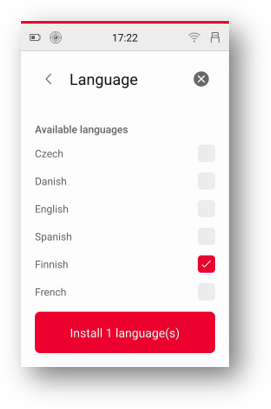
Figure 2: Install language screen.
For detailed instructions on installing language files, please refer to the Leica RTC300/500/700 User Manual, available on the myWorld Customer Portal or on the laser scanner.
This firmware release includes various system optimisations and performance enhancements to improve overall stability, reliability, and user experience.
Firmware Installation
The new firmware v1.2.0 can be installed on any Leica RTC300, RTC500, or RTC700 laser scanner, independent of any previous firmware version.
Compatibility with Leica Cyclone REGISTER 360 PLUS:
– Cyclone REGISTER 360 PLUS v2026.1.0 or higher is required to import firmware v1.2.0 data.
Compatibility with Leica Cyclone FIELD 360:
– Cyclone FIELD 360 v7.0.3 or higher is required to access all firmware v1.2.0 features.
For optimal performance and compatibility, we recommend to always run the latest versions of the field and office software.