
Leica Cyclone ENTERPRISE is a user-managed, on-premise project and data management solution for the reality capture market. Delivering a simplified enterprise-level management and collaboration platform, powered by Leica Geosystems’ JetStream technology, Cyclone ENTERPRISE facilitates:
It is possible to directly publish to Cyclone ENTERPRISE using the following versions of Cyclone REGISTER 360 PLUS.
-
Cyclone REGISTER 360 PLUS version 2021.0.0 or newer.
-
Cyclone REGISTER 360 PLUS (BLK Edition) version 2021.0.0 or newer.
Workflow
-
Choose a Finalized Registration in the Report section.
-
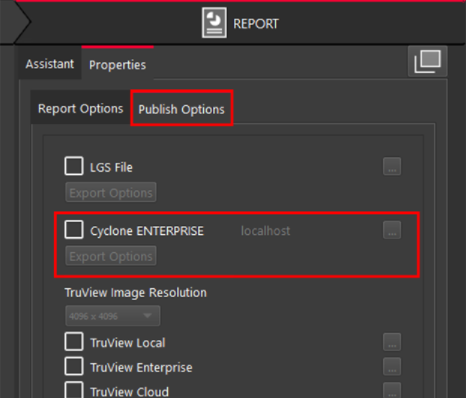
Click on "Publish Options" tab and select Cyclone ENTERPRISE.
-
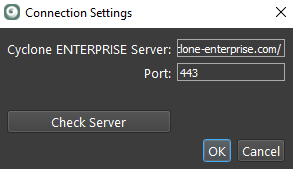
Upon selection, if the Cyclone ENTERPRISE server is not set yet, the “Connection Settings” dialog will pop up.
-
Enter the Cyclone ENTERPRISE Server address port.
For example: "localhost" and "5050" for the local Cyclone ENTERPRISE instance.
-
Click “Check Server”. If the provided address and port is correct and the server is functioning properly it will display "Connected".
-
Click OK to continue.
-
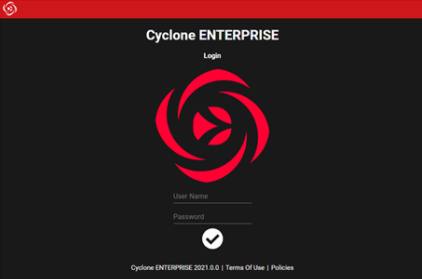
Login with a user that has publishing permission.
-
Choose the Group and Storage location for publishing.
Note: You may need to login to the Cyclone ENTERPRISE from the Internet browser and set the storage location if no Storage location is set.
-
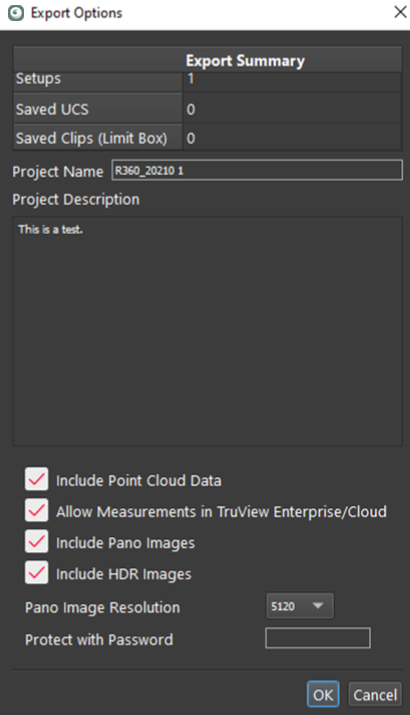
Choose Export Options.
-
Select OK to Publish.
Note: See Cyclone ENTERPRISE help doc for more details.