Cyclone REGISTER 360 PLUS uses the default language that Windows is using. Follow the steps below to change the default language.
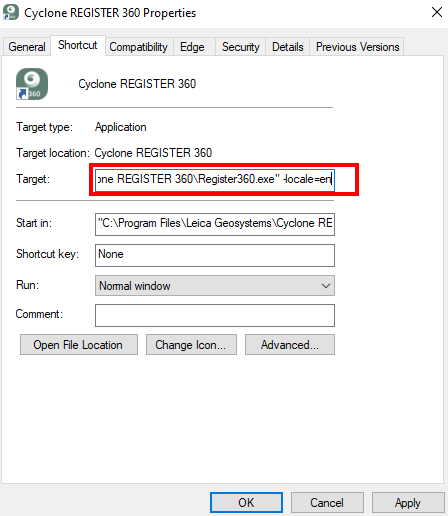
On the desktop, right-click the Cyclone REGISTER 360 PLUS shortcut (create one if there is no shortcut on the desktop) and go to Properties and add “-locale=(short name for country)” to the end of the register360.exe path as shown in the image. For example, for Germany, it would look like this: “-locale=de”.
Cyclone REGISTER 360 PLUS must be started from the shortcut for the change to take effect.
Country code list for supported languages:
locale=en - English
locale=de - German
locale=es - Spanish
locale=fr - French
locale=it - Italian
locale=ja - Japanese
locale=ko - Korean
locale=ru - Russian
locale=zh - Chinese (Simplified)