Function
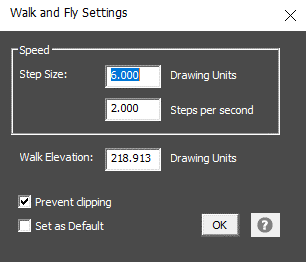
Allows the user to modify the movement rate, elevation and options which are applied when using the Walk or Fly features.
Procedure
Speed Options
Step Size "Drawing Units" defines the distance interval that is used to compute the next view origin position during walk or fly operations.
Step Size "Steps per Second" defines how many times the view origin is redefined during a one second interval while the arrow key is held down.
Walk Elevation
Set an explicit value for the Z value of the view origin. This value will default to the current view origin.
Prevent Clipping
Toggle this off for most situations. But if you see viewing anomalies such as planes that appear to be cut or gaps in front of the camera when using the Walk or Fly functions toggle this on.
Set as Default
Saves your step size preferences so they will be applied when you create a new drawing.