Function
Export the current drawing in model space or paper space as PDF.
Procedure
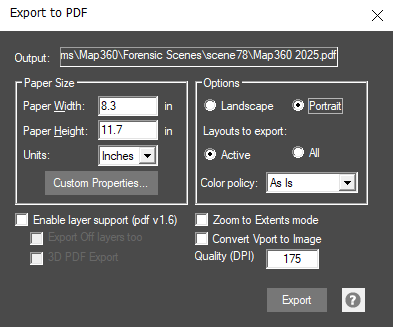
Set the Page size for the drawing and access custom properties.
Based on your drawing or layout, print as either portrait or landscape orientation and include all the layout tabs combined in the PDF or just the active layout.
Layer support allows defined layers in the drawing to be turned on or off in the PDF document by supported PDF readers. Layers that are turned off can also be exported to be turned on in the PDF if needed. 3D PDFs are also supported.
If zoom extents mode is enabled, the layout geometry will be zoomed to the paper size, otherwise layout settings will be applied.
The Convert Vport to Image option is useful when printing point clouds. When checked, the viewports in the current layout tab will be converted to an image before being printed to paper
Quality (DPI) controls the quality of images and pointclouds in your PDF file. Be aware of setting this value too high, as it could cause the generated PDF file to be so large in file size that it crashes your PDF viewing program (Adobe, Browser, etc…)