Function
Creates a parallel copy of a selected entity such as line, polyline, spline, arc, circle or rectangle.
Procedure
There are two methods to offset entities:
Run command first
Left click to select object to be offset
Specify offset distance by typing in a numeric value (or define distance on screen with two clicks)
Select side you want the parallel copy located
Right click or press enter to close out of command
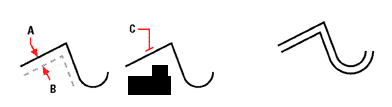
Preselect item to offset
Select object to offset then click on the offset command
Specify offset distance by typing in a numeric value (or define distance on screen with two clicks)
Select side you want the parallel copy located
Right click or press enter to close out of command.