Function
Map360 supports the newer GSI 8 and GSI 16 formats, as well as the older GRE/TRA formats defined by Leica Canada Inc.
Note: Leica System 1200 users should refer to the Leica FDE (Field Data Extractor) topic.
Procedure
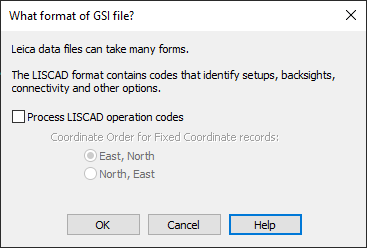
When you start the leicagsi command, you will see the following options dialog:
For Leica systems, Map360 supports the following GSI formats and LISCAD Operation Codes:
Leica GSI 8 Format (including Data Pro for LISCAD)
Leica GSI 16 Format (including Data Pro for LISCAD)
Supported Data Pro / LISCAD Operation Codes
If your GSI file includes LISCAD operation codes that you want Map360 to process, then be sure to enable the "Process LISCAD operation codes" checkbox. If your GSI file does NOT include LISCAD operation codes, then this checkbox can be left unchecked. If you are unsure, then enable this option - if your file contains them then they will be used, and if not then this option will not make any difference.
If LISCAD Operation Codes are being processed, you can also specify the coordinate order for Fixed Coordinate records. This option is used ONLY by Operation Code 9 to tell it whether the 43 and 44 words in a fixed coordinate record contain the easting or northing values.
Leica GSI 8 Format (including Data Pro for LISCAD)
We supply this sample to you so you can visually compare it to your file, in case you are either unsure if your file is a GSI 8 collector file, or if you are having problems with the coding. Due to the length of the lines in the collector file, they do wrap around onto the next lines in this sample. Please refer to your collector manual for more information on the formats.
410001+00000020 42....+00OFFICE
410002+00000021 42....+00JGR\PD
410003+00000022 42....+06081998
410004+00000009 42....+00000002 43....+1000.000 44....+1000.000 45....+0100.000
410009+00000005 42....+0000NAIL
410005+00000001 42....+00000002 43....+0001.600 44....+0001.615
410006+00000004 42....+000.0000
410007+00000003 42....+00000006 43....+00000001
110008+00000099 21.324+00000000 22.324+08959580 31..00+00156134 81..00+01000000 82..00+01156134 83..00+00100353 51..1.+0010+000
410009+00000005 42....+0000NAIL
410010+00000002 42....+0001.600
110011+00000003 21.324+08948350 22.324+09026240 31..00+00038456 81..00+01038455 82..00+01000128 83..00+00099705 51..1.+0010+000
410012+00000005 42....+0000NAIL
110013+00000003 21.324+26948450 22.324+26933350 31..00+00038456 81..00+01038454 82..00+01000126 83..00+00099705 51..1.+0010+000
110014+00000099 21.324+18000060 22.324+27000020 31..00+00156134 81..00+01000005 82..00+01156134 83..00+00100353 51..1.+0010+000
110015+00000099 21.324+35959530 22.324+08959570 31..00+00156133 81..00+00999995 82..00+01156133 83..00+00100353 51..1.+0010+000
110016+00000003 21.324+08948300 22.324+09026240 31..00+00038456 81..00+01038455 82..00+01000129 83..00+00099705 51..1.+0010+000
110017+00000003 21.324+26948450 22.324+26933350 31..00+00038456 81..00+01038455 82..00+01000126 83..00+00099705 51..1.+0010+000
110018+00000099 21.324+17959590 22.324+27000100 31..00+00156133 81..00+00999999 82..00+01156133 83..00+00100360 51..1.+0010+000
110019+00000099 21.324+35959510 22.324+08959580 31..00+00156134 81..00+00999994 82..00+01156134 83..00+00100353 51..1.+0010+000
110020+00000003 21.324+08948320 22.324+09026230 31..00+00038456 81..00+01038455 82..00+01000128 83..00+00099705 51..1.+0010+000
110021+00000003 21.324+26948480 22.324+26933330 31..00+00038456 81..00+01038455 82..00+01000125 83..00+00099704 51..1.+0010+000
110022+00000099 21.324+18000120 22.324+27000070 31..00+00156134 81..00+01000009 82..00+01156134 83..00+00100357 51..1.+0010+000
410023+00000001 42....+00000002 43....+0001.600 44....+0001.615
410024+00000002 42....+0001.750
110025+00002002 21.324+15720090 22.324+09035270 31..00+00029804 81..00+01011484 82..00+00972499 83..00+00099543 51..1.+0010+000
410026+00000090 42....+000CCONC 43....+00000001
410027+00000008 42....+00000001
110028+00002002 21.324+15238050 22.324+09036350 31..00+00027334 81..00+01012564 82..00+00975726 83..00+00099559 51..1.+0010+000
110029+00002003 21.324+15236180 22.324+09036550 31..00+00027350 81..00+01012584 82..00+00975718 83..00+00099556 51..1.+0010+023
110030+00002004 21.324+14820050 22.324+09035550 31..00+00024874 81..00+01013057 82..00+00978830 83..00+00099590 51..1.+0010+023
110031+00002005 21.324+13622580 22.324+09033130 31..00+00019052 81..00+01013142 82..00+00986207 83..00+00099666 51..1.+0010+023
110032+00002006 21.324+13403520 22.324+08957540 31..00+00009082 81..00+01006526 82..00+00993684 83..00+00099856 51..1.+0010+023
110033+00002007 21.324+12610350 22.324+09015440 31..00+00008073 81..00+01006516 82..00+00995235 83..00+00099813 51..1.+0010+023
110034+00002008 21.324+16930150 22.324+08834420 31..00+00004901 81..00+01000892 82..00+00995183 83..00+00099972 51..1.+0010+023
110035+00002009 21.324+16251540 22.324+08919010 31..00+00018971 81..00+01005589 82..00+00981873 83..00+00100076 51..1.+0010+023
410036+00000090 42....+000000UP 43....+00000000
110037+00002010 21.324+18733130 22.324+08914500 31..00+00019592 81..00+00997425 82..00+00980579 83..00+00100107 51..1.+0010+023
410038+00000090 42....+0000MHSS 43....+00000000
410039+00000002 42....+0001.750
110040+00002011 21.324+07704460 22.324+09103120 31..00+00013950 81..00+01013595 82..00+01003119 83..00+00099594 51..1.+0010+023
410041+00000090 42....+0000MHST 43....+00000000
410042+00000008 42....+00000001
410043+00000001 42....+00000003 43....+0001.600 44....+0001.600 45....+00000002
410044+00000003 42....+00000006 43....+00000001
110045+00000002 21.324+26948350 22.324+08933400 31..00+00038456 81..00+01000000 82..00+01000000 83..00+00099999 51..1.+0010+000
410046+00000005 42....+0000NAIL
410024+00000002 42....+0001.640
110047+00000004 21.324+09200240 22.324+09034030 31..00+00093260 81..00+01131653 82..00+00996866 83..00+00098781 51..1.+0010+000
410048+00000005 42....+0000NAIL
110049+00000004 21.324+27200220 22.324+26925520 31..00+00093260 81..00+01131653 82..00+00996863 83..00+00098779 51..1.+0010+000
110050+00000002 21.324+08948310 22.324+27026250 31..00+00038456 81..00+01000000 82..00+00999999 83..00+00100000 51..1.+0010+000
110051+00000002 21.324+26948110 22.324+08933390 31..00+00038456 81..00+01000000 82..00+00999996 83..00+00099999 51..1.+0010+000
110052+00000004 21.324+09200280 22.324+09034090 31..00+00093260 81..00+01131653 82..00+00996865 83..00+00098779 51..1.+0010+000
110053+00000004 21.324+27200340 22.324+26925510 31..00+00093260 81..00+01131653 82..00+00996857 83..00+00098779 51..1.+0010+000
110054+00000002 21.324+08948300 22.324+27026240 31..00+00038456 81..00+01000000 82..00+00999999 83..00+00100000 51..1.+0010+000
110055+00000002 21.324+26948170 22.324+08933330 31..00+00038456 81..00+01000000 82..00+00999997 83..00+00100001 51..1.+0010+000
110056+00000004 21.324+09200270 22.324+09034030 31..00+00093260 81..00+01131653 82..00+00996865 83..00+00098781 51..1.+0010+000
110057+00000004 21.324+27200330 22.324+26925580 31..00+00093260 81..00+01131653 82..00+00996858 83..00+00098782 51..1.+0010+000
110058+00000002 21.324+08948310 22.324+27026290 31..00+00038456 81..00+01000000 82..00+00999999 83..00+00100001 51..1.+0010+000
410059+00000001 42....+00000003 43....+0001.600 44....+0001.600
410060+00000002 42....+0001.750
110061+00003001 21.324+24348150 22.324+08956190 31..00+00011155 81..00+01028445 82..00+00995203 83..00+00099567 51..1.+0010+000
410062+00000090 42....+000CCONC 43....+00000002
410063+00000008 42....+00000001
110064+00003002 21.324+20026340 22.324+09012570 31..00+00029463 81..00+01028164 82..00+00972521 83..00+00099444 51..1.+0010+000
110065+00003003 21.324+20721040 22.324+09005070 31..00+00031088 81..00+01024171 82..00+00972515 83..00+00099508 51..1.+0010+000
110066+00003004 21.324+20524540 22.324+08951480 31..00+00029377 81..00+01025847 82..00+00973594 83..00+00099625 51..1.+0010+000
410067+00000090 42....+000000PP 43....+00000000
110068+00003005 21.324+21224220 22.324+09003000 31..00+00029112 81..00+01022853 82..00+00975550 83..00+00099529 51..1.+0010+000
410069+00000090 42....+000CCONC 43....+00000002
410070+00000008 42....+00000001
110071+00003006 21.324+21826070 22.324+09005490 31..00+00026224 81..00+01022153 82..00+00979586 83..00+00099510 51..1.+0010+000
110072+00003007 21.324+22945100 22.324+09003040 31..00+00021253 81..00+01022233 82..00+00986397 83..00+00099536 51..1.+0010+000
110073+00003008 21.324+25525540 22.324+08946290 31..00+00019793 81..00+01019298 82..00+00995149 83..00+00099633 51..1.+0010+000
110074+00003009 21.324+25050060 22.324+08945060 31..00+00014932 81..00+01024350 82..00+00995226 83..00+00099619 51..1.+0010+000
410075+00000011
110076+00003010 21.324+28215050 22.324+09057250 31..00+00009007 81..00+01029654 82..00+01002039 83..00+00099404 51..1.+0010+000
410077+00000090 42....+0000MHST 43....+00000000
110078+00003011 21.324+31354190 22.324+08932030 31..00+00022865 81..00+01021981 82..00+01015983 83..00+00099741 51..1.+0010+000
410079+00000090 42....+000000LP 43....+00000000
410080+00000002 42....+0001.750
110081+00003012 21.324+01623250 22.324+08957270 31..00+00032169 81..00+01047532 82..00+01030989 83..00+00099579 51..1.+0010+000
410082+00000090 42....+000CCONC 43....+00000003
410083+00000008 42....+00000001
110084+00003013 21.324+00524580 22.324+09001470 31..00+00031001 81..00+01041381 82..00+01030991 83..00+00099539 51..1.+0010+000
110085+00003014 21.324+00432150 22.324+09002300 31..00+00037126 81..00+01041392 82..00+01037137 83..00+00099528 51..1.+0010+000
110086+00003015 21.324+35900150 22.324+09001290 31..00+00036951 81..00+01037812 82..00+01037073 83..00+00099539 51..1.+0010+000
110087+00003016 21.324+35835180 22.324+08958410 31..00+00032017 81..00+01037666 82..00+01032135 83..00+00099567 51..1.+0010+000
110088+00003017 21.324+00237360 22.324+08959540 31..00+00028897 81..00+01039779 82..00+01028995 83..00+00099556 51..1.+0010+000
110089+00003018 21.324+01507570 22.324+08906380 31..00+00019354 81..00+01043506 82..00+01018808 83..00+00099855 51..1.+0010+000
410090+00000090 42....+000SHRUB 43....+00000000
110091+00003019 21.324+02144010 22.324+08846090 31..00+00013526 81..00+01043462 82..00+01012689 83..00+00099845 51..1.+0010+000
110092+00003020 21.324+01258500 22.324+08949550 31..00+00030093 81..00+01045214 82..00+01029452 83..00+00099643 51..1.+0010+000
410093+00000090 42....+0000BLDG 43....+00000001
410094+00000014 42....+00009960 43....+00000002
110095+00003021 21.324+07807150 22.324+08810200 31..00+00006952 81..00+01045254 82..00+01001558 83..00+00099776 51..1.+0010+000
410096+00000090 42....+0000BLDG 43....+00000001
410097+00000008 42....+00000001
110098+00003022 21.324+02713130 22.324+09054030 31..00+00002839 81..00+01039753 82..00+01002652 83..00+00099510 51..1.+0010+000
410099+00000090 42....+000CCONC 43....+00000003
110100+00003023 21.324+29205480 22.324+09536100 31..00+00000921 81..00+01037606 82..00+01000472 83..00+00099465 51..1.+0010+000
110101+00003024 21.324+18225430 22.324+09020420 31..00+00027561 81..00+01037287 82..00+00972592 83..00+00099389 51..1.+0010+000
410102+00000001 42....+00000004 43....+0001.640 44....+0001.600 45....+00000003
410103+00000003 42....+00000006 43....+00000001
110104+00000003 21.324+27200240 22.324+08925540 31..00+00093262 81..00+01038453 82..00+01000128 83..00+00099707 51..1.+0010+000
410105+00000005 42....+0000NAIL
410106+00000002 42....+0001.625
110107+00000005 21.324+35958290 22.324+09002010 31..00+00146681 81..00+01131589 82..00+01143547 83..00+00098672 51..1.+0010+000
410108+00000005 42....+0000NAIL
110109+00000005 21.324+17958390 22.324+26957570 31..00+00146681 81..00+01131596 82..00+01143548 83..00+00098671 51..1.+0010+000
110110+00000003 21.324+09200230 22.324+27033590 31..00+00093262 81..00+01038453 82..00+01000131 83..00+00099704 51..1.+0010+000
110111+00000003 21.324+27200200 22.324+08926030 31..00+00093261 81..00+01038453 82..00+01000126 83..00+00099703 51..1.+0010+000
110112+00000005 21.324+35958300 22.324+09002030 31..00+00146681 81..00+01131590 82..00+01143547 83..00+00098670 51..1.+0010+000
110113+00000005 21.324+17958400 22.324+26957580 31..00+00146681 81..00+01131597 82..00+01143548 83..00+00098672 51..1.+0010+000
110114+00000003 21.324+09200270 22.324+27034000 31..00+00093262 81..00+01038453 82..00+01000134 83..00+00099705 51..1.+0010+000
110115+00000003 21.324+27200220 22.324+08925580 31..00+00093262 81..00+01038453 82..00+01000127 83..00+00099705 51..1.+0010+000
110116+00000005 21.324+35958280 22.324+09001580 31..00+00146681 81..00+01131588 82..00+01143547 83..00+00098673 51..1.+0010+000
110117+00000005 21.324+17958460 22.324+26958020 31..00+00146681 81..00+01131601 82..00+01143547 83..00+00098674 51..1.+0010+000
110118+00000003 21.324+09200240 22.324+27033570 31..00+00093262 81..00+01038453 82..00+01000132 83..00+00099703 51..1.+0010+000
410119+00000001 42....+00000004 43....+0001.640 44....+0001.600
410120+00000002 42....+0001.750
110121+00004001 21.324+21255540 22.324+08936400 31..00+00030325 81..00+01115168 82..00+00971415 83..00+00098862 51..1.+0010+000
410122+00000090 42....+000CCONC 43....+00000004
410123+00000008 42....+00000001
110124+00004002 21.324+20215060 22.324+08941230 31..00+00027464 81..00+01121253 82..00+00971448 83..00+00098805 51..1.+0010+000
410125+00000008 42....+00000006
110126+00004003 21.324+19006260 22.324+08956560 31..00+00022261 81..00+01127747 82..00+00974951 83..00+00098676 51..1.+0010+000
110127+00004004 21.324+17608420 22.324+09034330 31..00+00012056 81..00+01132464 82..00+00984838 83..00+00098535 51..1.+0010+000
110128+00004005 21.324+16943210 22.324+09052290 31..00+00004583 81..00+01132471 82..00+00992358 83..00+00098586 51..1.+0010+000
110129+00004006 21.324+23825480 22.324+08616020 31..00+00017438 81..00+01116827 82..00+00987756 83..00+00099792 51..1.+0010+000
Leica GSI 16 Format (including Data Pro for LISCAD)
We supply this sample to you so you can visually compare it to your file, in case you are either unsure if your file is a GSI 16 collector file, or if you are having problems with the coding. Due to the length of the lines in the collector file, they do wrap around onto the next lines in this sample. Please refer to your collector manual for more information on the formats.
*110001+0000000000000002 21.124+0000000018000000 22.104+0000000008832000 31...0+0000000000140732 51..0.+000000000000+000 87..00+0000000000001600 88..00+0000000000001550
*110002+0000000000000003 21.124+0000000018601200 22.104+0000000008918350 31...0+0000000000028754 51..0.+000000000000+000 87..00+0000000000001600 88..00+0000000000001550
*110003+0000000000000004 21.124+0000000031156200 22.104+0000000009357160 31...0+0000000000024983 51..0.+000000000000+000 87..00+0000000000001600 88..00+0000000000001550
*110004+0000000000000005 21.124+0000000031610210 22.104+0000000009357390 31...0+0000000000025004 51..0.+000000000000+000 87..00+0000000000001600 88..00+0000000000001550
*110005+0000000000000006 21.124+0000000027916270 22.104+0000000009150080 31...0+0000000000110035 51..0.+000000000000+000 87..00+0000000000001600 88..00+0000000000001550
*110006+0000000000000007 21.124+0000000027457490 22.104+0000000009225040 31...0+0000000000107445 51..0.+000000000000+000 87..00+0000000000001600 88..00+0000000000001550
*110007+0000000000000008 21.124+0000000027001360 22.104+0000000009119490 31...0+0000000000107094 51..0.+000000000000+000 87..00+0000000000001600 88..00+0000000000001550
*110008+0000000000000009 21.124+0000000023648560 22.104+0000000009015430 31...0+0000000000116440 51..0.+000000000000+000 87..00+0000000000001600 88..00+0000000000001550
*110009+0000000000000016 21.124+0000000010000020 22.104+0000000009153540 31...0+0000000000107074 51..0.+000000000000+000 87..00+0000000000001600 88..00+0000000000001550
*110010+0000000000000017 21.124+0000000011446330 22.104+0000000009301370 31...0+0000000000020405 51..0.+000000000000+000 87..00+0000000000001600 88..00+0000000000001550
*110011+0000000000000018 21.124+0000000016201040 22.104+0000000009121500 31...0+0000000000010327 51..0.+000000000000+000 87..00+0000000000001600 88..00+0000000000001550
*110012+0000000000000019 21.124+0000000000449140 22.104+0000000009027330 31...0+0000000000140990 51..0.+000000000000+000 87..00+0000000000001600 88..00+0000000000001550
*110013+0000000000000239 21.124+0000000011314150 22.104+0000000009139260 31...0+0000000000028613 51..0.+000000000000+000 87..00+0000000000001600 88..00+0000000000001550
*110014+0000000000000238 21.124+0000000020130150 22.104+0000000008723420 31...0+0000000000012061 51..0.+000000000000+000 87..00+0000000000001600 88..00+0000000000001550
Supported Data Pro / LISCAD Codes
This topic documents the DATAPRO / LISCAD operation codes that may be used when performing field surveys with Leica/Wild data recorders for processing in Map360.
This format uses operation codes for the organization of field data and line connectivity. When field data is recorded using these codes and imported into Map360 via the GSI option, the linework will be automatically drawn on a new layer named LEICADRAWN. Raw observation data is processed into a Map360 traverse file at this time as well.
Operation Code = Leica/Wild Code Block
Feature Code = MicroSurvey description
For METRIC, all distances are assumed to be in millimeters or tenths of a millimeter, as set on the instrument.
For FEET, all distances are assumed to be in tenths or hundredths of a foot.
OPERATION CODE 1 - New Set Up (Before Observation)
Station Point Identifier
Instrument Height
Target Height
Backsight Station Point Identifier - Optional
The backsight station point number must be known at reduction time. If on datum, information block 4 is not used or is set to zero. If a backsight station is set, the next observation will be used to calculate the bearing rotation to be applied to the following observations.
OPERATION CODE 2 - New Target Height (Before Observation)
Target Height
OPERATION CODE 4 - Fixed Azimuth (After an instrument setup)
Fixed Azimuth
Operation Code 4 is always used in conjunction with and immediately after a new set up (operation code 1). These operation codes may be used together in the following methods.
Method 1-Setting an Azimuth to a reference object:
Opcode Info1 Info2 Info3 Info4
1 Station ID Instrument Height Target Height Blank
4 Fixed Azimuth
The first observation after Opcode 4 is interpreted as a backsight to a point of specified fixed azimuth from the station setup point.
This will generate a field file setup code 103
Example:
Opcode Info1 Info2 Info3 Info4
1 1 1.6 1.5
4 90
First Observation is to point 5
Interpretation: The fixed azimuth of 90 degrees is from point 1 to point 5
Method 2-Setting an Azimuth on a traverse leg:
Opcode Info1 Info2 Info3 Info4
1 Station ID Instrument Height Target Height Backsight Point ID
4 Fixed Azimuth
The first observation after Opcode 4 is interpreted as a backsight to the specified backsight point.
The second observation after Opcode 4 is interpreted as a foresight to the next traverse station.
The fixed azimuth entered is the azimuth from the setup station ID to the backsight.
Example:
Opcode Info1 Info2 Info3 Info4
1 1 1.6 1.5 5
4 90
First Observation is to point 5
Second Observation is to point 2
Interpretation: The fixed azimuth of 90 degrees is from point 1 to point 5
OPERATION CODE 5 - New Feature Code (After first observation)
New feature code
When Map360 processes operation code 5, the feature code (and the string identifier which may be contained within the feature code) is processed.
Note: The feature code is set for the previous point and subsequent points until changed.
If the feature code defines a string in the code table, and you wish to end the current string but start a new string with the same feature code, simply use operation code 5 again and enter the same feature code. If
feature code 102 is defined in the code table as a string, the example below would join points 10 through to 12 with a string and then start a new string at point 13 through to 15.
Example: Observation to point 10
Operation Code 5 (enter feature code 102)
Observation to point 11
Observation to point 12
Observation to point 13
Operation Code 5 (enter feature code 102)
Observation to point 14
Observation to point 15
OPERATION CODE 6 - Measured Offsets (After Observation)
Offset +ve right, -ve left (as viewed from instrument)
Added Distance +ve away from instrument, -ve towards instrument
Height Difference +ve up, -ve down
OPERATION CODE -6 – Move Point along Line
Distance
Elevation Flag
If zero is entered for the Elevation Flag then the point will have no elevation. Entering 1 will result in the point taking the elevation of the measured point, while entering 2 will result in a graded elevation being computed between the measured point and the previously measured point.
OPERATION CODE 7 - Circle with Radii (After Observation)
Radius
Radius \
Radius } Optional
Radius /
OPERATION CODE 8 - Line Creation Methods (After first observation)
Line Creation Method
For Line Type 8 (Wings), the following blocks are also used:
Length of wing at start of string
Length of wing at end of string
The number of subsequent points included in the line feature depends on the Line Creation Method selected.
The following Line Creation Methods are supported.
STRAIGHT LINE STRING [Default]
CURVED LINE STRING
CIRCLE BY CENTER AND RADIAL POINT
CIRCLE BY DIAMETER POINTS
CIRCLE BY 3 CIRCUMFERENCE POINTS
CURVE BY 3 CIRCUMFERENCE POINTS
CURVE BETWEEN TANGENT LINES
BUILDING WINGS
Building Wings explanation (Line Type 8):
‘Wings’ of the specified lengths are added to the beginning and end of strings.
The operation code will take affect on the previous observation (if string-able) and any observation following which is string-able.
The operation will continue to run for subsequent strings until terminated with a new line type (Op Code 8) entry. - typically 1 - a straight line.
The format of the code block is:
410028+00000008 42....+00000008 43....+00007500 44....+00007500.
Positive values for the ‘Wing’ will result in them being drawn to the right of the defined line, negative left.
If either dimension is not input, the previous entered value will be taken as the wing measurement. If there has been no value previously entered, the wing length will default to 5 meters.
NOTE: All straight and curved lines which are observed during the operation of a wing will have the defined wings attached.
OPERATION CODE 9 - Fixed Coordinate (Independent)
Point Identifier
North (or East) coordinate
East (or North) coordinate
Elevation
OPERATION CODE 13 - Join points (Anytime after points are defined)
Feature Code
First Point Identifier
Second Point Identifier
Third Point Identifier (optional)
The point identifiers input must have been previously defined.
If the third point is entered, a curve is created, which will also replace that part of any line that is through the same three points with the same code.
OPERATION CODE 14 - Description (After Observation)
Description
Description (Optional)
Description (Optional)
Description (Optional)
Information words 1, 2, 3 and 4 are concatenated into a single description, except where the wildcard "#x" is contained in the Map360 code table description. (x indicates the information word)
If #x is in the code table description, then it is replaced by the corresponding information word.
If #2 is in the codetable description but there is nothing in info 2, the resulting description is truncated after the #1 insertion. Similarly for #3 and #4.
Example:
Code Table Description TREE #1 #2high.
Info 1 ELM
Info 2 2.1
Resulting Point Description TREE ELM 2.1high.
Info 1 ELM
Resulting Point Description TREE ELM
OPERATION CODE 16 - Point on Line (After Line Defined)
New Point Identifier
Starting Point on Line
Ending Point on Line
Distance from Starting Point
OPERATION CODE 17 - Rectangle (After first Point Observed)
Width of rectangle. (Optional)
Width of Step (Optional)
The previous point and the subsequent point will define the base of the rectangle. The rectangle will be formed to the right of its defined base if a positive width is entered, or left if negative. If the first information word is not entered or is entered as zero, then a square will be constructed with all sides equal to the base defined by the two measured points. If "Width of Step" is entered, lines will be drawn within the rectangle parallel to the base.
OPERATION CODE 19 - Remove Elevation from point (After Observation)
The Elevation of the previous observation will be removed. (set to -9999.999)
OPERATION CODE 90 - Split Feature Code and String Identifier
Feature Code
String Identifier
This is an alternative to using operation code 5.
In operation code 5, the feature code and string identifier are entered in a single item in info 1.
Operation code 90 allows the feature code component to be entered in info 1 and the string identifier to be entered in info 2. When Map360 processes operation code 90, the two info words are combined into a single field code containing the feature code and the string identifier.
OPERATION CODE 99 - Ignore last measurement (After observation)
The previous measurement will be marked and passed to the EDM file as a comment only.