Function
Import coordinate points from a file.
Procedure
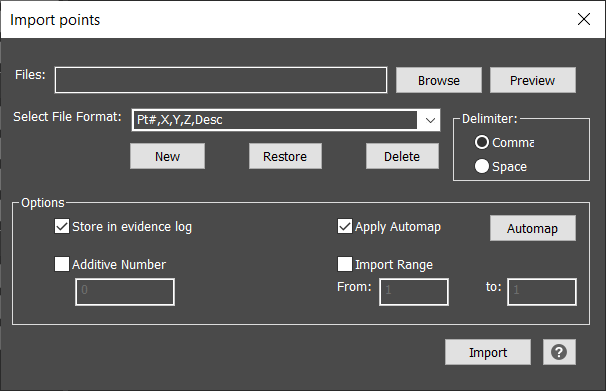
Browse to a points file (txt, csv, xyz, etc.) and preview the file in notepad before importing.
A .zip was added to support Zeno Mobile project files and is intended only for such files.
Choose the appropriate file format and delimiter. If a file format without point numbers is chosen, then the next available point number will be assigned. Each piece of data (Point Number, X, Y, Z, Description) is separated by either a space or a comma. Choose which applies to your file.
Select New to define a custom file format that is not listed.
The imported points can be stored in the evidence log and Automap can be applied. When Apply Automap is checked, the Automap button is enabled, and a user can set up their AutoMap file to be applied. When unchecked, just the points will be imported with point labels but the linework will not be processed.
An additive number can be entered and this value will be added to the point number as it is read in from the file. For example, if the value was set to 100 then every point will have 100 added to it. If the point being read in was 32 then it will be imported as 132.
Provide a range for the lower and upper limit of the numbers to import and only that range of points will be import.