Function
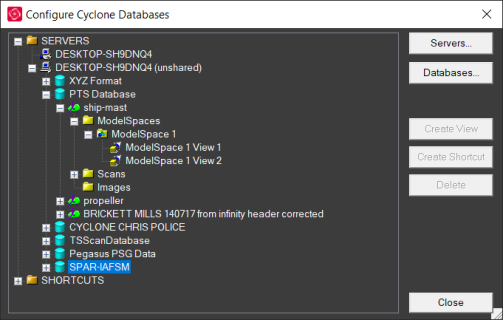
Configure the Cyclone Databases and servers used for the Import Cyclone and Import Cyclone Legacy routines.
Procedure
Servers
Choose this option to specify which servers appear listed. By default, you will have two, which will have “your computer name” and “your computer name + (unshared)”. It is mostly common to use the “your computer name + (unshared)” server.
Databases
Choose and manage which databases are present for the server you have currently selected.
Create View
Choose this option to create an extra view in the selected Model Space. Used in the Cyclone program itself for loading in extra views.
Create Shortcut
Choose this option create a copy of the selected ModelSpace View path in into the SHORTCUTS folder for easier reference.
Delete
Choose this option to delete the selected ModelSpace View.