Function
This option adds Points to a selection set of objects in your drawing.
Procedure
The following dialog will appear when you start this command:
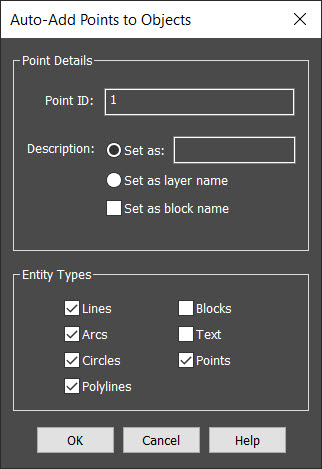
The new points will be numbered starting with the specified Point ID, and with a Description of either the specified value, the layer name of the selected entity, or the block name of the selected block entity.
You can also customize the entity filter, to control which entity types will be auto-added.
You are then prompted for the objects to auto-add; select as many as desired with the standard entity selection methods (window, crossing, etc.).
Note: You can bypass this dialog and run the command at the commandline (like in previous versions) by running the command as -AUTOP with a dash.
Points
Points will be added to the coordinate database at all selected point nodes.
Lines
Points will be added to the coordinate database at the start and end points of all selected lines.
Lines will also be added to the figures database, linking them with their associated points, and annotated with Bearings and Distances as configured in either the System Toggles or Hot Toggles.
Arcs
Points will be added to the coordinate database at the start, end, and radial points of all selected arcs.
Arcs will also be added to the figures database, linking them with their associated points.
Circles
Points will be added to the coordinate database at the center point of all selected circles.
Polylines
Points will be added to the coordinate database at the vertices of all selected polylines/lwpolylines/3dpolylines, and at the radial point of any arc segments.
If the polyline has been Splined or Curve Fitted (via the Edit Polyline command) then the points will be created along the original "decurved" geometry.
The polyline will not be broken up (exploded) into individual segments, so the polyline is not added into the figures database and labeled like lines and arcs are. If you want the polyline segments to be added to the database then you will have to explode it first to convert it into regular Line and Arc segments.
Blocks
Points will be added to the coordinate database at the insertion point of all selected blocks/inserts.
Please note that if you want to add coordinates to Point Blocks created by various third-party applications, please see the Import Point Blocks topics which will also preserve the original point IDs, descriptions, and elevations.
Text
Points will be added to the coordinate database at the insertion point of all selected text. Multiline text is ignored.