Function
Body Poser allows you to insert a 2D human form into your drawing providing accurately scaled non-graphical representations for your diagrams.
Procedure
Select the Body Poser command and from pull down select from Male, Female or Child form as depicted below.
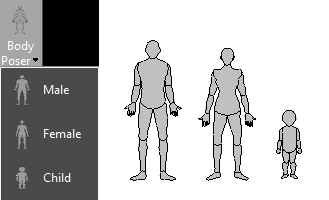
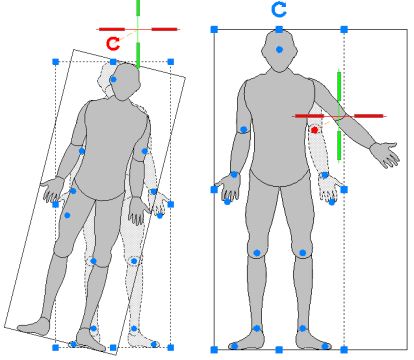
After you have made your selection, left click where you wish to place the bodyinto your drawing. Once placed you can select the body for grips to display, which allows you to rotate, move or stretch the body..
Hover mouse over rotation arrow changes it to red, click to activate, and second click to set rotation angle. Hovering over an articulation point turns grip red then left click and use mouse to reposition limb and second click to place.
Modifying Properties
Select the body for the Properties panel to display on left side as shown below. If Properties are not open, right click and select Properties from the menu.
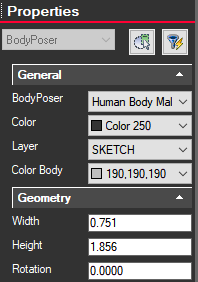
In Properties under the Body Poser drop down you can select to change to back or side views. You can also modify the overall color, change the layer, rotation or modify dimensions including entering an exact height.
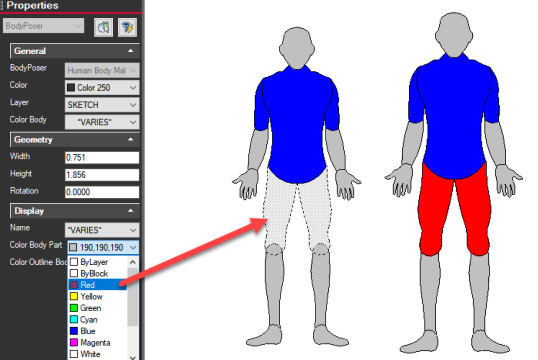
Add solid fill color to specific areas by left clicking on section or use Ctrl and left mouse to select more than one area. The selected area will then display as shaded with dashed outlines. On the Properties dialog select Color Body Part and from drop down select color or chose Select Color option that will display a color pallet to choose from.
In this example red shorts were added to the figure: