February 16, 2026 | Reality Cloud Studio
New features
Australia added as a new storage region
HxDR is now deployed in Australia and following countries will use this region by default: Australia, New Zealand, Indonesia, Brunei, Malaysia, Singapore.
A new storage center in Australia will reduce latency for nearby countries, improve performance and responsiveness, and strengthen data‑residency and compliance capabilities by keeping data within regional borders.
Additionally, the names of the storage regions were updated for more consistency.
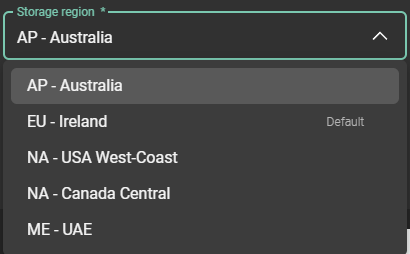
Consistent naming for storage regions
Sharing scenes
Sharing scenes is as easy as sharing assets with external teams. Users can now share scenes, including inspection scenes of Deviation analysis and Point Cloud Classification.
Sharing Scenes, Classifications, and Deviation Analyses gives everyone a clear, up‑to‑date view of the site. It keeps teams aligned, makes it easy to spot issues early, and helps streamline collaboration all the way through to final approval.
Additionally, when a scene is shared, the visualization and transformation icons retain their current state. If an asset is set to invisible or locked, its corresponding controls will appear greyed out, preventing external users from modifying those settings.
Improvements
Update on project member roles overview matrix - “Consumes seat on the company account” was removed as it is outdated and “Can download source files” was added.
.png?inst-v=189e9461-c622-4ec9-8b74-6359680d1bc4)
Updated project member role permission matrix
Bug fixes
Rotate and Scale stay selected - the scene transformation tool no longer resets to Move after each action.
No “Save” button shown when saving is not allowed - Shared assets no longer display a measurement “Save” button for viewers without permission.