
Download
Download your data is a convenient way to share transferable files with external users. Reality Cloud Studio allows you to export both the original file or your processed point cloud and mesh in the following formats.
Point cloud exports | Mesh formats | Other Formats |
|---|---|---|
E57 | OBJ (.zip) | 3D Map (.byte) |
LAS | ||
PTS |
Access the export options by clicking the Export button in the upper right of the asset view.
The asset may also be exported from the Asset Dashboard.
Downloading consumes your subscription quota.
Original File
Users can export original uploaded file format. Clicking on the file name will begin the download.
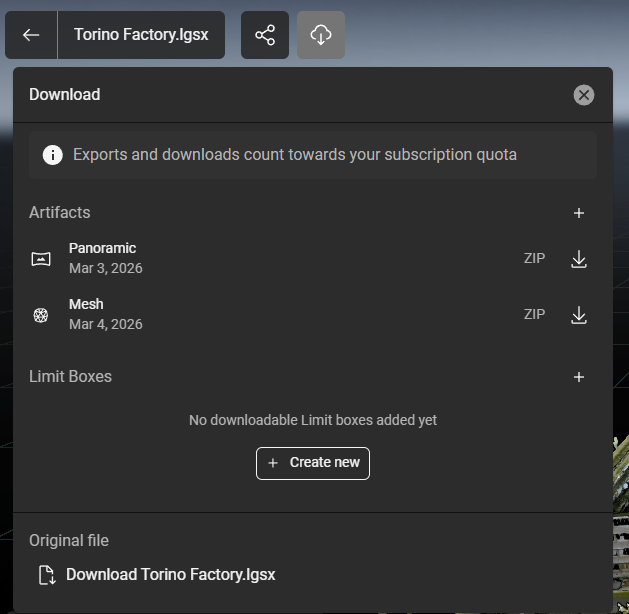
Download button
Create downloadable Limit boxes
Users can download the processed point cloud as E57, LAS and PTS formats.
Select a limit box and check the desired format and click “Generate”. This will start the conversion of the point cloud to the selected format.
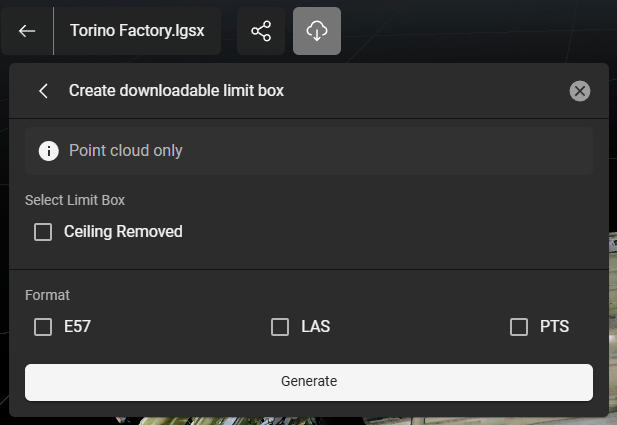
Download limit box in needed format
When the conversion is done, click the download icon of the generated limit box.