Inviting internal users to company account

1. Navigate to https://hxdr.app/

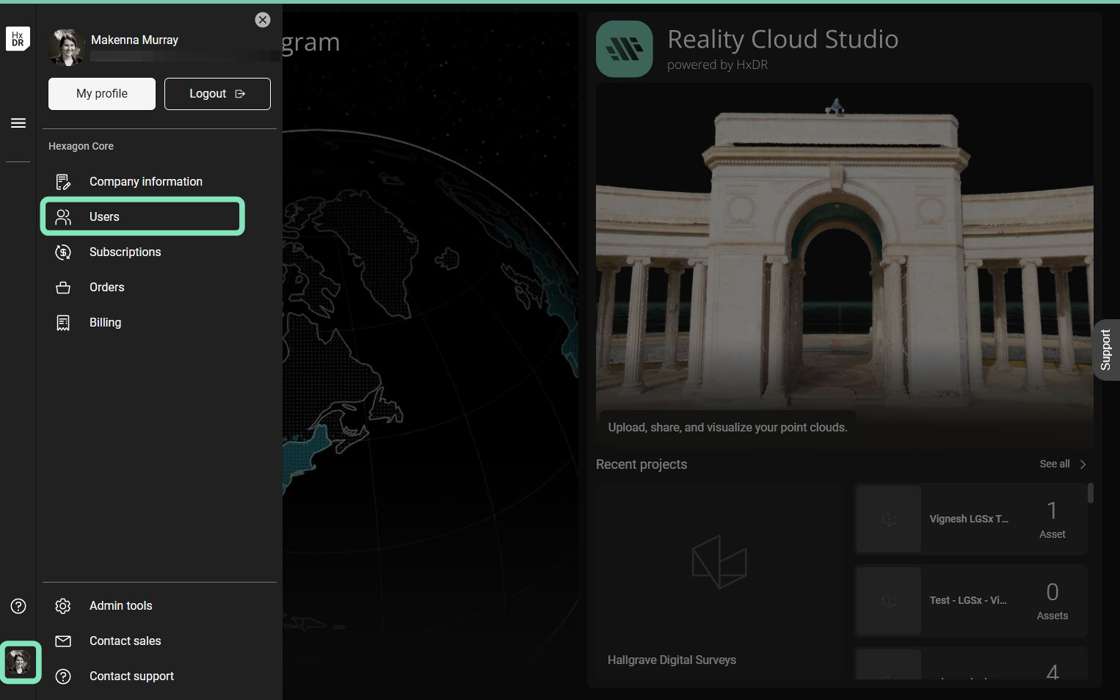
2. Select your User icon in the lower left corner.

Select Users from the options.
https://ajeuwbhvhr.cloudimg.io/https://colony-recorder.s3.amazonaws.com/files/2025-10-28/48f5ea4c-60da-494b-b779-2f268753ba6d/user_cropped_screenshot.webp?tl_px=0,0&br_px=1526,954&force_format=jpeg&q=100&width=1120.0

3. Click Invite members.

https://ajeuwbhvhr.cloudimg.io/https://colony-recorder.s3.amazonaws.com/files/2025-10-28/5b12fa5d-f673-49b1-9073-2b7ef538be9b/user_cropped_screenshot.webp?tl_px=532,0&br_px=1511,547&force_format=jpeg&q=100&width=979

4. Enter the user's Email address and select their Account role.

Optionally, add a Message to be delivered with the invitation.

https://ajeuwbhvhr.cloudimg.io/https://colony-recorder.s3.amazonaws.com/files/2025-10-28/27de6937-c3a3-413f-995b-8b635fd206a1/user_cropped_screenshot.webp?tl_px=281,203&br_px=1261,750&force_format=jpeg&q=100&width=979

5. If you are unsure about what Account role to assign a user, click Learn more about company account roles to view a description of each role and its privileges.

https://ajeuwbhvhr.cloudimg.io/https://colony-recorder.s3.amazonaws.com/files/2025-10-28/e4c4ec62-7fe1-4c53-b4a9-7a57b640f1a9/user_cropped_screenshot.webp?tl_px=271,202&br_px=1254,751&force_format=jpeg&q=100&width=983

6. Click Add to add the user to the invitation list. You may repeat the steps above to add additional users to the invitation list and send a bulk invitation.

https://ajeuwbhvhr.cloudimg.io/https://colony-recorder.s3.amazonaws.com/files/2025-10-28/571590dc-57a0-4781-a499-5120c6f1ff15/user_cropped_screenshot.webp?tl_px=273,203&br_px=1252,750&force_format=jpeg&q=100&width=979

7. Click Send invitations to deliver invitations to all users on your invitation list.

https://ajeuwbhvhr.cloudimg.io/https://colony-recorder.s3.amazonaws.com/files/2025-10-28/c1201e20-792a-405c-9065-1bfc309e52a2/user_cropped_screenshot.webp?tl_px=282,355&br_px=1265,904&force_format=jpeg&q=100&width=983

8. You will receive a message that your invitations have been sent.

https://ajeuwbhvhr.cloudimg.io/https://colony-recorder.s3.amazonaws.com/files/2025-10-28/f19c24ee-bf7f-4147-af30-762b96ebc16a/user_cropped_screenshot.webp?tl_px=189,156&br_px=1336,797&force_format=jpeg&q=100&width=1120.0

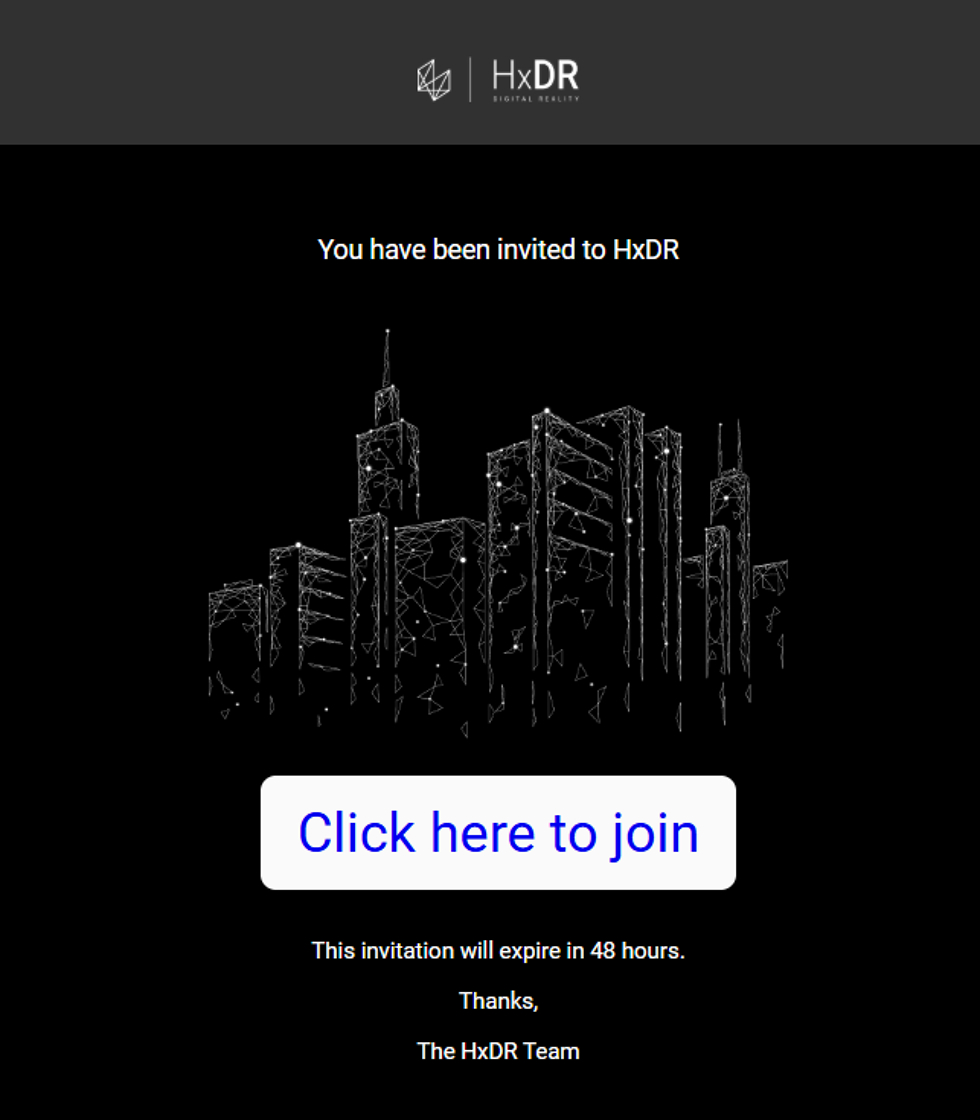
9. Your users will receive an email invitation with a link to accept the invitation and join the account. Users must follow this invitation link to be added to the account and login.
https://ajeuwbhvhr.cloudimg.io/https://colony-recorder.s3.amazonaws.com/files/2025-10-28/a5e5165c-4b45-4309-a77e-25a1c7b64143/screenshot.webp?tl_px=0,0&br_px=643,735&force_format=jpeg&q=100&width=980

Once an email address accepts an invitation and a user account is created, no additional invitations can be sent to that email address.

Invitation links expire after 30 days. If the user has not accepted within that period, send a new invitation.