---
title: "TV Selecting a Presentation"
slug: "truview-tv-selecting-a-presentation"
updated: 2026-09-07T08:46:33Z
published: 2026-09-07T08:46:33Z
canonical: "rcdocs.leica-geosystems.com/truview-tv-selecting-a-presentation"
---
> ## Documentation Index
> Fetch the complete documentation index at: https://rcdocs.leica-geosystems.com/llms.txt
> Use this file to discover all available pages before exploring further.
# TV Selecting a Presentation
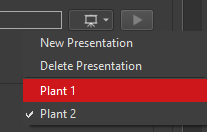
If there is more than one presentation present in a project you can change the active presentation by clicking the presentation dropdown and selecting the appropriate presentation. The active presentation will have a check mark next to it.