---
title: "TV Creating a New Presentation"
slug: "truview-tv-creating-a-new-presentation"
updated: 2026-09-07T08:46:33Z
published: 2026-09-07T08:46:33Z
canonical: "rcdocs.leica-geosystems.com/truview-tv-creating-a-new-presentation"
---
> ## Documentation Index
> Fetch the complete documentation index at: https://rcdocs.leica-geosystems.com/llms.txt
> Use this file to discover all available pages before exploring further.
# TV Creating a New Presentation
To create a new Presentation open the snapshots tab, select the presentation dropdown then select, New Presentation.
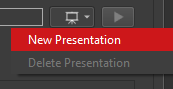
The Presentation will automatically be named with the name of your active Project. Edit the Presentation name by clicking on the name text.

Once you have created a Snapshot Presentation, the Take a Snapshot button will be activated.