Clips define an area of interest within a project and hide data that is outside of that area of interest. Clips are useful for navigation, visualization and analysis as they allow the user to hone in on important details without subdividing a project or deleting data.
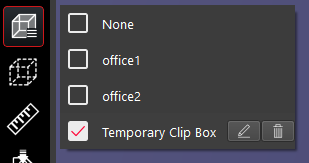
Saved Clips allows you to select from a list of available Clips that were previously saved before the data was published.
Saved Clips also contains Clips that were created during the current TruView session.
Multiple Clips can be turned on simultaneously.
Both point clouds and Models will adhere to the Clip Box.
A Time Clip and a Clip created using the other Clip tools can coexist in the same project. Two Time Clips or two Clips created manually or By Size cannot coexist in the same project.
Clips saved to the project from upstream products cannot be edited or deleted.
Clips created from the Clip by time tool cannot be edited but can be deleted.
To activate a Clip Box select the Saved Clips button and select the Clip Box(es) that you would like to turn on. Temporary clips can be edited by selecting the Edit button and can be deleted using the Delete button.