Deleting the Control File
- 1 minute(s) read
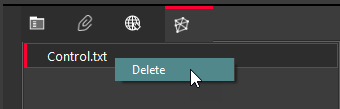
Right-click the Control File object on the Controls tab and select Delete to delete the control file.
Was this article helpful?
Related articles
Cyclone REGISTER 360 PLUS > Help | Cyclone REGISTER 360 > Review and Optimize > Applied Control
Cyclone 3DR > Help Center | Cyclone 3DR > Help Command by Command > Home
Map360 > Help | Leica Map360 > Edit Ribbon