Read captured project data directly from a mobile device over a trusted local network.
What this API provides
Read-only access to jobs, setups, scans, tags and related metadata
Streaming access to point-cloud, imagery and attachment files
E57 export and unprocessed-image retrieval where source data is available
Important security notice
The API uses plain HTTP and does not provide API authentication. Use it only on a trusted, isolated local network or a direct device hotspot. Do not expose the service to the internet or an untrusted network.
1. Introduction
The Cyclone FIELD 360 mobile application includes a lightweight on-device HTTP server. An authorised companion application or desktop client can use the REST API to browse and download data captured or synchronised on the mobile device.
Designed for data retrieval
The API is read-only. It supports GET and OPTIONS requests. It does not create, edit or delete FIELD 360 data.
1.1 Typical integration workflow
Connect the client computer and mobile device to the same trusted Wi-Fi network or device hotspot.
Obtain the mobile device IP address and the dynamically assigned API port from the supported app or integration workflow.
Call the version endpoint to confirm that the server is reachable and identify the data-model version.
List jobs, then retrieve the required setups, scans, tags or other resources.
Stream the required files. Use HTTP range requests for large binary payloads when resume support is needed.
1.2 Integration characteristics
Property | Value |
|---|---|
Protocol | HTTP/1.1, plain HTTP |
Route prefix | /api/v1 |
Metadata format | JSON, UTF-8 |
File transfer | Binary streams |
Authentication | None; relies on local network and device trust |
Access model | Read-only |
Platforms | iOS and Android |
Resource identifiers | UUIDs; routing is case-insensitive |
1.3 Scope and limitations
The API exposes data currently available on the mobile device.
Some endpoints depend on the job type and whether the required source data has been synchronised to the device.
The API does not provide TLS encryption, user authentication or write operations.
Clients must discover the assigned API port. A fixed port must not be assumed.
2. Connecting to the API
2.1 Base URL
The server listens on the mobile device network interfaces. Build requests using the mobile device LAN or hotspot IP address and the port assigned when the API starts:
http://<DEVICE_IP>:<PORT>/api/v1/<resource>Placeholder | Description | Example |
|---|---|---|
<DEVICE_IP> | Wi-Fi or hotspot IP address of the phone or tablet | 192.168.1.42 |
<PORT> | Port selected dynamically at startup | 8081 |
<resource> | Requested API resource | jobs |
Do not use localhost
The client runs on a different device from the API server. Do not use localhost or 127.0.0.1, and do not hard-code the legacy Windows port 32000.
2.2 Connectivity check
Use the version information endpoint as the first connectivity and schema check:
curl http://192.168.1.42:8081/api/v1/versioninfoA successful response returns a JSON object containing the data-model schema version.
2.3 Port selection
At startup, the application selects the first available port from a platform-provided range. The selected port can therefore change. Integrations should obtain the current port through the supported application or integration workflow rather than assume a fixed value.
2.4 Security requirements
Use only a trusted local Wi-Fi network or a direct device hotspot.
Do not forward the API port through a router, VPN gateway or public tunnel.
Do not expose the device IP address and API port in public logs or support attachments.
Treat downloaded point clouds, imagery, tags and metadata according to your organisation's data-handling rules.
End the local connection when the data transfer is complete.
3. Request and response conventions
3.1 Supported HTTP methods
Method | Behaviour |
|---|---|
GET /v1/<resource> | Lists resource instances as a JSON array. |
GET /v1/<resource>/<id> | Retrieves one instance by UUID. |
GET /v1/<resource>/<id>/<subroute> | Retrieves a detail document or binary payload. |
OPTIONS | Returns 200 OK and Allow: OPTIONS, GET. |
HEAD | Returns 501 Not Implemented. |
POST, PUT, PATCH, DELETE | Returns 405 Method Not Allowed. The API is read-only. |
3.2 Query parameters
Parameter | Applies to | Purpose |
|---|---|---|
full_nested | List and retrieve | Embeds related objects instead of returning only their IDs. |
filter__job_type=<int> | GET /v1/jobs | Filters jobs by job-type enumeration. |
filter__job_id=<uuid> | GET /v1/controlpoints | Filters control points by owning job. |
layer=<name> | Cube-face and LWPO routes | Selects range, intensity, validity, color or infrared. Default: range. |
image=<id> | Unprocessed-image route | Streams one image instead of returning the image-ID list. |
3.3 Standard object fields
Serialized objects include common lifecycle fields and then resource-specific fields. Fields related to a remote or device origin appear only on applicable objects.
{
  "id": "07210aea-f4bf-47e9-bb8f-35ed9d51b8bb",
  "remoteId": "...",
  "remoteIds": { "<ownerIdentifier>": "..." },
  "deviceModificationTime": 1718000000,
  "createdTime": 1717000000,
  "lastModifiedTime": 1717500000,
  "inDatabase": true,
  "modified": false,
  "deleted": false
}
3.4 Status codes
Code | Meaning | Typical cause |
|---|---|---|
200 | OK | Request completed successfully. |
206 | Partial Content | A valid byte range was returned. |
404 | Not Found | Route, object or source file is unavailable. |
405 | Method Not Allowed | A write method was sent to this read-only API. |
416 | Range Not Satisfiable | The requested byte range is invalid. |
500 | Internal Error | The server could not complete the request. |
501 | Not Implemented | The requested handler, such as HEAD, is not implemented. |
4. Resource overview
All routes in this section are relative to the following base:
http://<DEVICE_IP>:<PORT>/apiResource | Route | Common use |
|---|---|---|
Version info | /v1/versioninfo | Check connectivity and data-model version. |
Jobs | /v1/jobs | Browse top-level captured projects. |
Bundles | /v1/bundles | Read registration groupings of setups. |
Setups | /v1/setups | Read scanner stations, placement and imagery. |
Scans | /v1/scans | Read individual scans and data-availability flags. |
Links | /v1/links | Read registration links between setups. |
Setup info | /v1/setupinfo | Read derived image and geometry information. |
Scanner settings | /v1/scannersettings | Read the scanner configuration resource. |
Sensor data | /v1/sensordata | Read GNSS, compass and altimeter metadata. |
Raw | /v1/raw | Read raw-artifact metadata and stream blobs. |
Image info | /v1/imageinfo | Read image dimensions, projection and transforms. |
Thumbnails | /v1/thumbnails | Read preview metadata and image blobs. |
Tags | /v1/tags | Read annotations and their 3D positions. |
Tag attachments | /v1/tagattachments | Download attached files and thumbnails. |
Tag taxonomy | /v1/tagcategories and related routes | Read categories, values, fields and labels. |
Control points | /v1/controlpoints | Read target-fitting control points. |
Limit boxes | /v1/limitboxes | Read clipping and limit-box definitions. |
5. Core project data
5.1 Jobs
A job is the top-level container for a capture project. It can reference setups, registration bundles, tags, thumbnails, control points and the tag taxonomy.
GET /v1/jobs
GET /v1/jobs/<id>
GET /v1/jobs?filter__job_type=<int>
GET /v1/jobs/<id>?full_nested
Key field | Description |
|---|---|
name / description | Job identification and description. |
type | Job-type enumeration. |
setups / unlinkedSetups | Setup references, including setups outside a bundle. |
bundles | Registration bundle references. |
tags / thumbnails | Annotation and preview references. |
controlPoints | Control-point references. |
setupCount / totalSetupCount | Visible and total setup counts. |
tagCount / totalTagCount | Visible and total tag counts. |
hasMultiAttachmentTags | Indicates whether a tag has multiple attachments. |
5.2 Setups
A setup represents one scanner station or position and its associated imagery and scan data. The setup list returns setups that belong to a job.
GET /v1/setups
GET /v1/setups/<id>
GET /v1/setups/<id>?full_nested
Area | Examples of available data |
|---|---|
Identity | Name, description, visibility and owning job or bundle. |
Placement | Map position, visual-registration delta pose and tilt matrices. |
Scanner | Serial number, scanner type, hardware and firmware versions. |
Publishing | Publishing application and application version. |
Relationships | Tags, links, thumbnails, raw artifacts and scans. |
Georeferencing | Flag indicating whether georeferencing is applied. |
Nested image metadata | Per-layer cube-face metadata when full_nested is used. |
6. Scans and downloadable content
6.1 Scans
A scan is an individual scan within a setup. Scan objects provide metadata, relationships and availability flags for locally accessible data.
GET /v1/scans
GET /v1/scans/<id>
Sub-route | Content | Notes |
|---|---|---|
/definition | Scan definition document | Text response. |
/lwpo?layer=<layer> | LWPO layer | Range-capable binary stream. |
/hspc | HSPC point-cloud package | Streams tree.hspc.pack. |
/panorama | Panorama image | Streams panorama.tga. |
/e57 | E57 point cloud | Available when the required source raw exists. |
/unprocessed-images | Image ID list or image stream | Use image=<id> to retrieve one image. |
6.2 Setup imagery and exports
Route | Result |
|---|---|
/v1/setups/<id>/definition | Scan-definition text. |
/v1/setups/<id>/lwpo?layer=<layer> | Selected raw layered image data. |
/v1/setups/<id>/cubeface?layer=<layer> | Cube-face image metadata. |
/v1/setups/<id>/cubeface/<face>?layer=<layer> | Image bytes for posx, negx, posy, negy, posz or negz. |
/v1/setups/<id>/e57 | E57 export delegated through the setup's scan data. |
/v1/setups/<id>/unprocessed-images | Unprocessed-image list or selected image stream. |
6.3 E57 export
The E57 contains a kinematically corrected, non-coloured point cloud.
The E57 is generated on first access from the downloaded source raw point cloud and is cached beside the source.
Availability follows the source raw data, not the cache. The hasE57 scan flag reports availability without starting conversion.
The endpoint returns 404 when the scan is unknown or the required source raw is unavailable.
Job applicability
E57 and unprocessed-image export routes apply to RTC-series and Livelink jobs.
6.4 Estimated data volumes
Download size depends on the selected scan resolution and the data available for the setup. The following values were measured on representative test jobs and are provided only as practical guidance for storage and transfer planning.
Job / scan resolution | Point cloud (E57) | Panorama-camera images |
|---|---|---|
Job 25 mm | 48.1 MiB | 128.7 MiB (36 JPEG files) |
Job 6 mm | 605.1 MiB | 128.7 MiB (36 JPEG files) |
Job 1.6 mm | 9.5 GiB | 129.0 MiB (36 JPEG files) |
Additional measured metadata volume: Temperature data was 41.1 KiB in the Job 25 mm measurement. This value is independent of the point-cloud resolution used in that test.
Approximate values
These measurements are examples, not limits or guaranteed file sizes. Actual values may be smaller or larger. Customers should check available storage before starting an export, particularly for high-resolution E57 data.
7. Imagery, tags and supporting metadata
7.1 Unprocessed images
The list form returns a sorted JSON array of available unprocessed frame-camera image file names. The download form streams one selected image.
GET /v1/scans/<id>/unprocessed-images
GET /v1/scans/<id>/unprocessed-images?image=<id>
The image ID must be a plain file name.
IDs containing /, \ or .. are rejected with 404 to prevent path traversal.
An unknown scan or missing image returns 404. A scan with no images returns an empty list.
The hasUnprocessedImages scan flag reports availability.
7.2 Raw artifacts and image information
GET /v1/raw
GET /v1/raw/<id>
GET /v1/raw/<id>/blob
GET /v1/imageinfo/<id>
Raw resources provide artifact type, size, format code and an optional image-info reference. Image information can include width, height, value range, exposure, projection and transformation.
7.3 Tags and attachments
Resource | Available information |
|---|---|
Tags | Type, visibility, name, MIME type, description, 3D position and file name. |
Tag attachments | Name, MIME type, relative stored file and thumbnail paths, and attachment type. |
Tag taxonomy | Categories, category values, fields and field labels. |
Control points | Coordinates, description, associated tag bridge and target references. |
GET /v1/tagattachments/<id>/blob
GET /v1/tagattachments/<id>/thumbnail
7.4 Sensor data
Sensor-data resources can contain GNSS latitude, longitude, altitude, HDOP and a raw NMEA GGA message, together with barometric altitude and compass heading, accuracy and availability flags.
8. Data storage, retention and deletion
The REST API is read-only and cannot delete FIELD 360 data. Data retention is controlled through the scanner, the FIELD 360 job browser and the job storage settings. No fixed automatic retention duration is defined in this guide.
8.1 Configure raw-data storage when creating a job
When creating a job, use the storage settings to control which scan data is retained on the mobile device:
Enable storage of raw data for export to standard file formats: clear this option when raw scan data does not need to be retained for later export. Raw scan data can be very large and may quickly use the available storage space on the tablet.
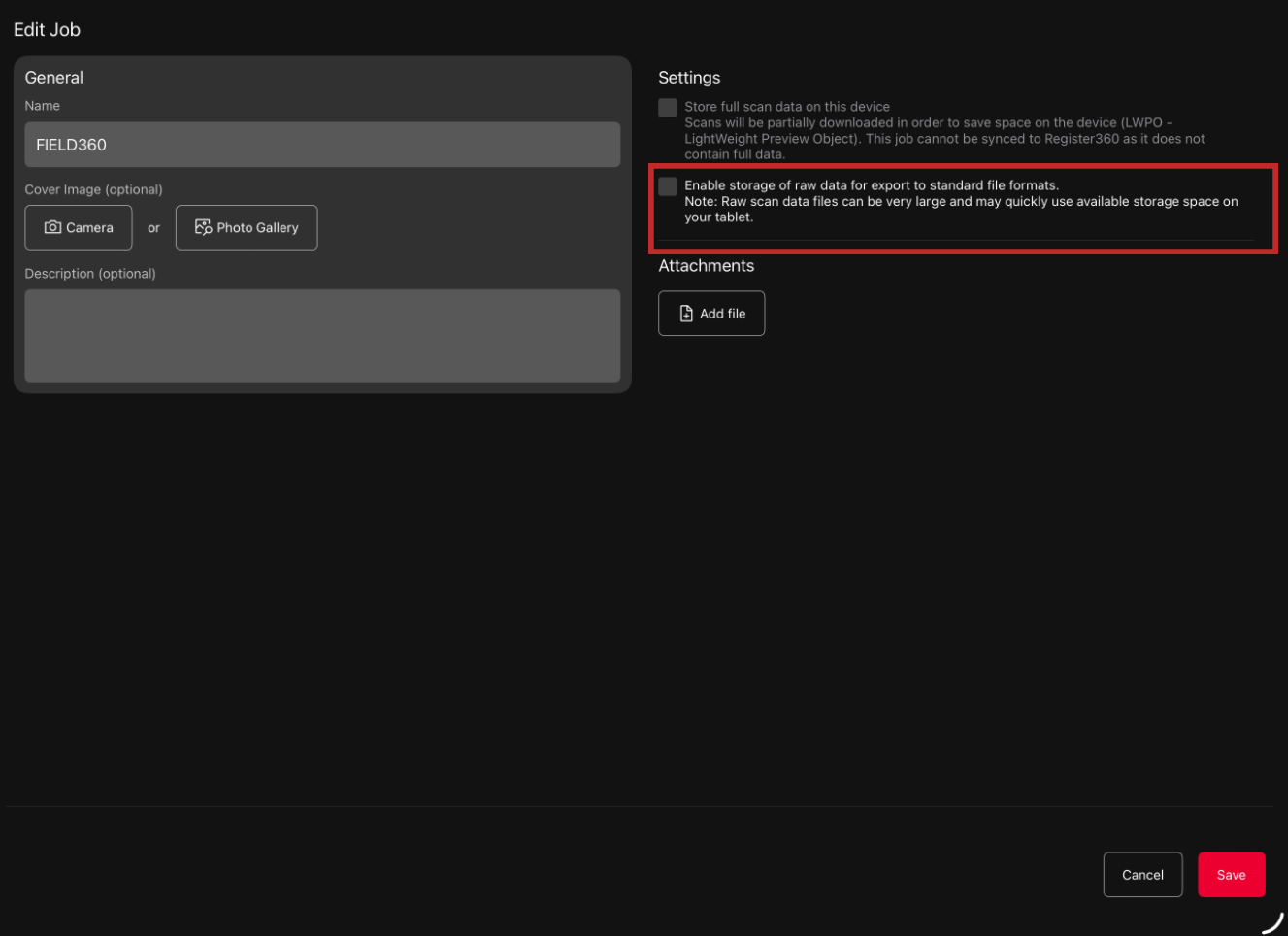
Job storage settings in Cyclone FIELD 360
Important: Turning off raw-data storage option removes previously stored raw data for the job.
Required storage can vary significantly. In the measured examples, an E57 point cloud ranged from approximately 48.1 MiB for a 25 mm job to approximately 9.5 GiB for a 1.6 mm job. Panorama-camera imagery was approximately 128.7 to 129.0 MiB for 36 JPEG files. These values are representative measurements only and may vary for other jobs, scanners or software versions.
8.2 Fully remove project data
To fully remove a project and its locally stored data, delete the project from both storage locations:
Delete the project from the scanner. Use the scanner project-management workflow to remove the project and scan data stored on the scanner.
Delete the corresponding job in Cyclone FIELD 360. Use the FIELD 360 job-management workflow to delete the job and data stored on the mobile device.
Verify removal. Confirm that the project is no longer listed on the scanner and that the job is no longer listed in FIELD 360.
8.3 Effect on API access and exports
After the FIELD 360 job is deleted, its jobs, setups, scans, imagery, attachments and related metadata are no longer available through the on-device REST API.
E57 and unprocessed-image availability depends on the required source data being present. If raw-data storage is disabled, or the source project or job has been deleted, related raw downloads and exports may no longer be available.
Any copies previously exported or downloaded to another system are outside the on-device deletion workflow and must be deleted separately in the destination system, where required.
8.4 Retention summary
Storage location | Retention control | Removal action |
|---|---|---|
Scanner | Project remains until removed through scanner project management. | Delete the project from the scanner. |
FIELD 360 mobile device | Job data remains until the job is deleted. Raw-data retention for a new job is controlled by the job storage option. | Delete the job in FIELD 360. Clear "Enable storage of raw data for export to standard file formats" when raw data should not be stored for the job. |
External download or export destination | Controlled by the destination system, not by the on-device API. | Delete separately in the destination system, where required. |
9. Downloading large files
Binary endpoints support the HTTP Range header, allowing integration to retrieve part of a file and resume an interrupted transfer.
9.1 Supported range forms
Header value | Meaning |
|---|---|
bytes=<from>- | From the specified byte to the end. |
bytes=-<to> | Suffix range as accepted by the API. |
bytes=<from>-<to> | Specified inclusive byte range. |
9.2 Example partial download
curl -H "Range: bytes=0-1048575" \
  http://192.168.1.42:8081/api/v1/raw/367d8b01-24c4-4c17-9332-31e95412539b/blob \
  -o chunk.bin
A valid range request returns 206 Partial Content. An invalid range returns 416 Range Not Satisfiable.
9.3 Recommended client behaviour
Check the HTTP status code before processing the response.
Use Range requests for large binary payloads when your client supports resume.
Do not treat a cached E57 as independently available. Check the hasE57 flag or the endpoint response.
Use availability flags to avoid unnecessary requests for missing payloads.
Store downloaded customer data only in an approved destination.
10. Usage examples
The examples below assume that the device IP address is 192.168.1.42 and the dynamically assigned port is 8081. Replace IDs with values returned by your device.
Check the schema version
curl http://192.168.1.42:8081/api/v1/versioninfoList jobs
curl http://192.168.1.42:8081/api/v1/jobsRetrieve a job with nested resources
curl "http://192.168.1.42:8081/api/v1/jobs/e6bd578d-8ae2-4f80-b1e0-4fa5a19ee3bc?full_nested"Download an E57 point cloud
curl http://192.168.1.42:8081/api/v1/scans/07210aea-f4bf-47e9-bb8f-35ed9d51b8bb/e57 \
  -o scan.e57
List and download an unprocessed image
curl http://192.168.1.42:8081/api/v1/scans/07210aea-f4bf-47e9-bb8f-35ed9d51b8bb/unprocessed-images
# Example list response: ["image_0001.jpg", "image_0002.jpg"]
curl "http://192.168.1.42:8081/api/v1/scans/07210aea-f4bf-47e9-bb8f-35ed9d51b8bb/unprocessed-images?image=image_0001.jpg" \
  -o image_0001.jpg
Retrieve an intensity cube face
curl "http://192.168.1.42:8081/api/v1/setups/07210aea-f4bf-47e9-bb8f-35ed9d51b8bb/cubeface/posx?layer=intensity" \
  -o posx_intensity.bin
11. Troubleshooting
Symptom | Check |
|---|---|
Cannot connect | Confirm that both devices are on the same trusted local network, the device IP is correct and the current dynamically assigned port is being used. |
404 on an object | Confirm the UUID and route. The object or its source file may not be available on the device. |
404 on E57 | Confirm that the required downloaded source raw exists. Use hasE57 to check availability without starting conversion. |
Empty unprocessed-image list | No supported unprocessed images are currently available for that scan. |
405 response | Only GET and OPTIONS are supported. Remove POST, PUT, PATCH or DELETE. |
416 response | Correct the Range header so that it addresses a valid byte range. |
501 response | HEAD and other unimplemented handlers are not supported. |
Unexpected schema | Read modelVersion from /v1/versioninfo and ensure the client supports that data model. |
11.1 Before contacting support
Record the FIELD 360 application version and mobile operating system.
Record the response status code and requested route, but remove customer-sensitive values where appropriate.
Confirm the device IP and current port locally. Do not include network credentials.
Check /v1/versioninfo and record the modelVersion.
State the job type and whether the required data is present on the mobile device.
Protect customer information
Logs, URLs and downloaded payloads can contain project identifiers, scanner information, coordinates, imagery or other customer data. Share only what is necessary through approved support channels.
Appendix A. Quick reference
Task | Request |
|---|---|
Check API/schema | GET /api/v1/versioninfo |
List jobs | GET /api/v1/jobs |
Retrieve nested job | GET /api/v1/jobs/<id>?full_nested |
List setups | GET /api/v1/setups |
List scans | GET /api/v1/scans |
Download setup E57 | GET /api/v1/setups/<id>/e57 |
Download scan E57 | GET /api/v1/scans/<id>/e57 |
List unprocessed images | GET /api/v1/scans/<id>/unprocessed-images |
Download one image | GET /api/v1/scans/<id>/unprocessed-images?image=<id> |
Download raw blob | GET /api/v1/raw/<id>/blob |
Download tag attachment | GET /api/v1/tagattachments/<id>/blob |
Download thumbnail | GET /api/v1/thumbnails/<id>/blob |
Appendix B. Document notes
This customer-facing guide describes the observed on-device REST API contract supplied for Cyclone FIELD 360 on iOS and Android. Endpoint availability depends on the data present on the device and, for export routes, the applicable job and source-data conditions.
Implementation note
The source material does not specify the customer-facing UI steps used to start the server or display the assigned port. Integrations must use the supported application or integration workflow to obtain this information.