Overview
A Report Data
is an object available in the TreeView like a mesh, a point cloud, a measure, etc.
The Report Data contains data to use in a report. This data is, mainly, added automatically in the project by commands providing data such as: measurements, comparisons or various analysis (like a Compare Inspect).
A Report Data can contain:
one or several view sets (at least one by default)
tables of data
pictures
other values such as computation results, command parameters, graphics, etc.
When you launch the Report Editor for the first time after creating a report data, a chapter will be automatically created, using a default Report Template.
Interaction
From the object explorer
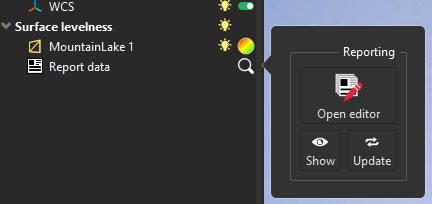
From the object explorer, click on the magnifying glass  next to the Report Data to see all available actions.
|
|
|---|


Measures
If you add a measure in the folder where the Report Data is, the measure will automatically appear in the table in the corresponding chapter.
When you create a measure by clicking on an object with a color gradient, the measure will be created in the same folder as the object.
Manual creation
You can create a Report Data from measures.
Select measure(s)
Go to Create Custom Chapter
You can also access it from the Contextual Menu by selecting the Add new chapter in the report option.
Report Data in the Report Editor
All information stored in all Report Data is available in the Data Panel of the Report Editor. So you can create a custom chapter using data from several Report Data.