CloudWorx includes a wide range of tools specially designed for working with reality capture data in CAD software. These tools can be used in combination with the native toolset of the user’s preferred CAD system to improve the user’s visualisation, modelling, and deliverable creation experience.
The tools are organised within the toolbar according to their usage. In addition to the buttons within the toolbar, tools can be triggered from the command line. Each tool’s command is listed on the individual tool’s page and on the Command Reference page.
Note: The command line prompts will differ depending on the selected CAD system.
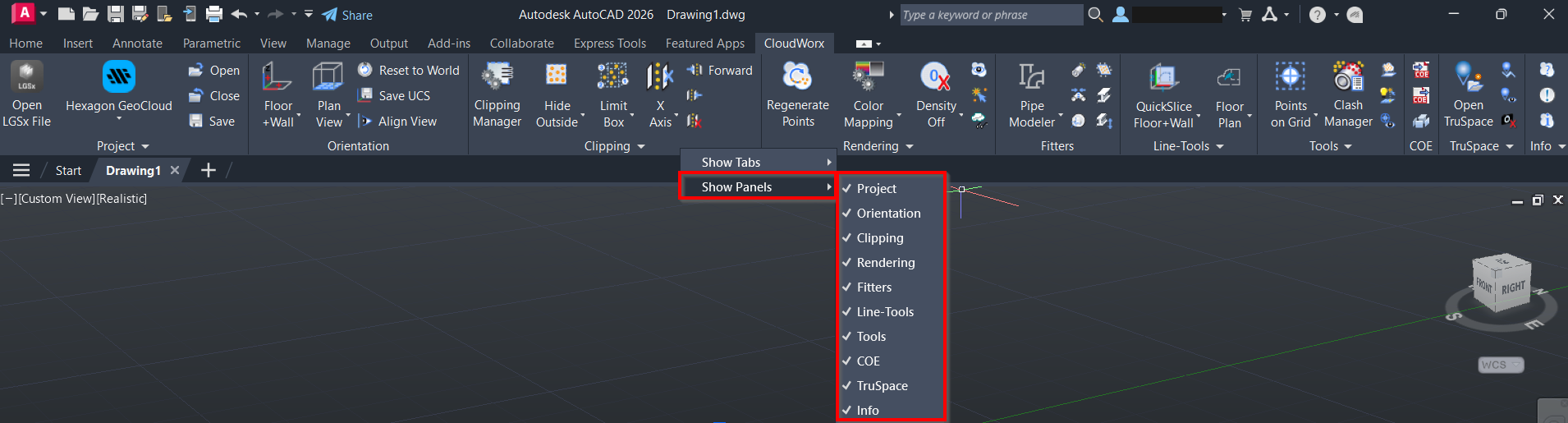
Users can customise their toolbar by right-clicking within the CloudWorx menu, selecting Show Panels and selecting or deselecting sub-menus to display.
Point Picking
Many CloudWorx tools, such as orientation, workplane, measurement, and fitting tools, require users to select points directly from a point cloud. To ensure accurate point selection, configure the appropriate CAD object snap settings before using these tools.
To enable point picking, type OSNAP in the CAD command line. In the Drafting Settings dialog, go to the Object Snap tab, select the Object Snap On check box and then select the Node object snap mode.
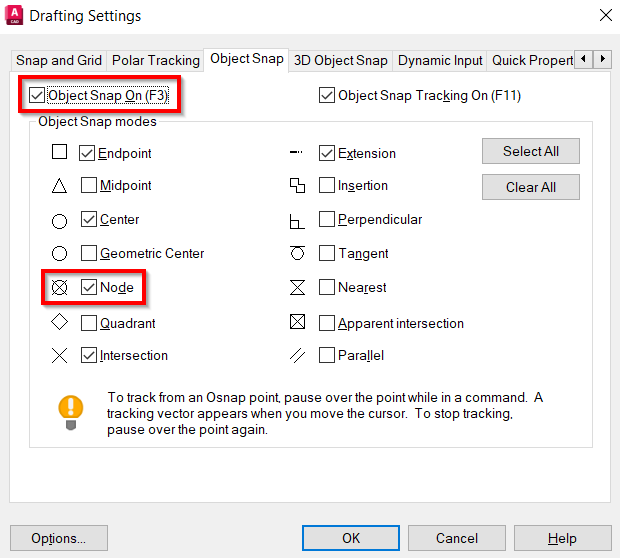
When point snapping is enabled, all commands, including CAD commands that require 3D point clicking, will perform picking on point clouds. When a cloud point is picked, the 3D position will be returned. However, the result may not be compatible with some 2D commands, such as POLYLINE.