AutoCAD / BricsCAD: CWVIEWPORTMODE
Static Query is crucial for obtaining high-quality data points for analysis. Unlike Visualization Queries, which focus on providing a visual representation of data, Static Query offers more precise results. This is because Static Query is designed to filter out any data points that fall outside of the specified criteria, thereby ensuring that only the most relevant data points are obtained.
The user invokes this command only once at the start of a session, or perhaps only once ever. The setting will be saved and remembered for future CAD sessions and applied to all of their particular projects.
Enabling or disabling a Static Query is only available from the command line using a corresponding command line prompt.
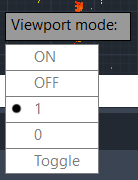
OFF or 0: Loads points according to the point budget and don't consider position relative to the current viewport. In general, users can expect to get a similar set of points when doing a reload, regardless of where they are looking.
ON or 1: Gives points that are visible within the current viewport priority when doing a reload. In general, this means that there will be a higher point density in the areas that are currently in view compared to the areas that are not visible.
Toggle: Toggles to another setting.
The default behavior is "static".
Note: The points received during a reload depend on several factors, such as the organization of points within blocks in the file, point budget, etc.
The user will need to regenerate points to see the effects of this change.