
CloudWorx for AutoCAD 2026.0.1 / CloudWorx Viewer for AutoCAD 2026.0.1
CloudWorx for Revit 2026.0.1 / CloudWorx Viewer for Revit 2026.0.1
CloudWorx for NavisWorks 2026.0.1
CloudWorx for BricsCAD 2026.0.1 / COE plugin for BricsCAD 2026.0.1
CloudWorx 2026.0.1 is a minor release that provides compatibility with Autodesk 2027 for CloudWorx plugins, including CloudWorx for AutoCAD, Revit, and Navisworks. It also includes a few bug fixes to improve overall stability.
autocadrevitnavisworks
CloudWorx for AutoCAD, Revit, and Navisworks is now compatible with Autodesk 2027, enabling users to leverage the latest CAD platform features alongside the CloudWorx toolset.
all cloudworx
CloudWorx now supports connection and streaming from Hexagon GeoCloud.
Hexagon GeoCloud is a new cloud service that merges Reality Cloud Studio and GeoCloud Drive into a single solution. It provides customers with a secure, centralised platform to store, process, and share geodata across technologies, such as GNSS receivers, total stations, and reality capture scanners.
The CloudWorx ribbon has been updated with new icons and text to reflect Hexagon GeoCloud integration, but their position on the ribbon remains unchanged to ensure familiarity.
Older versions of CloudWorx with support for Reality Cloud Studio will redirect to Hexagon GeoCloud via HxDR. All existing projects have been automatically migrated to the new service.
all cloudworx
Fixed an issue that prevented E57 files exported from Cyclone 3DR 2026.0 from being imported into CloudWorx.
Fixed an issue where classes in LGSx files exported from Pegasus Office were excluded from the Point Cloud Classifications list, making it impossible to hide associated points. The affected classes will have no category text, but they can be toggled on/off, and the color can be adjusted.
The currently supported host CAD application versions per product are as follows:
AutoCAD, Civil 3D, Plant3D and Map3D 2024 - 2027
Navisworks Simulate and Manage 2024 - 2027
Revit Architecture, MEP and Structure 2024 - 2027
BricsCAD V23 - V26
CloudWorx 2026.0.1 is compatible with Cyclone ENTERPRISE 2021.0.0 and higher.
CloudWorx 2026.0.1 is compatible with Hexagon GeoCloud.
Administrator-level privileges for the workstation are required to correctly install LeicaCloudWorx software. CloudWorx requires at minimum CLM version 2.14.
CLM 2.29.0 is now packaged with the new MSI installers. If no previous version of CLM is detected, during the installation process, a prompt will be presented to install CLM per the image below:
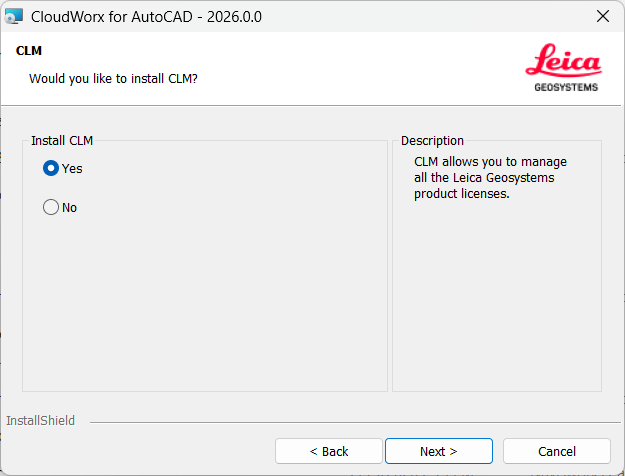
If CLM is already installed, the installer will detect it and will not install the new version.
Note: If the install CLM option is selected, it will take a few minutes after the plugin installation wizard is closed for the CLM install to complete. CLM will be installed in the background process, and no progress window will be shown.
Leica Geosystems strives to provide support for the widest array of operating systems and file formats given current technologies and support from third-party partners.
With each release, we review our list of currently supported formats and operating systems in line with industry trends and announced product terminations.
Leica Geosystems may add or terminate support for a file format during any release. Obsolete operating systems will be supported for six months after their announced termination or the next major software release, whichever comes first. Server products will be supported in alignment with Leica’s Client License Manager (CLM) supported servers to guard users against incompatibility.
Cyclone CORE is phased out as of version 2025.2.0.
CLM versions prior to 2.5 are no longer supported.
JetStream Enterprise is phased out after version 2024.1.
The Align to Surface tool, activated by the CWVALIGN command, is no longer supported as of version 2025.2.0.
CloudWorx for Bentley is phased out after version 2025.1.0.
all cloudworx
Projects uploaded to Hexagon GeoCloud between October 2024 and February 2025 may have an issue where limit boxes created in Hexagon GeoCloud have an incorrect origin or “anchor point” and should not be activated in the clipping manager in CloudWorx. To correct this issue, re-upload the original file to Hexagon GeoCloud.
IT security measures, such as firewalls and packet sniffers, can affect the performance of streaming data from Hexagon GeoCloud. For the best streaming performance, all URLs associated with HxDR and Hexagon GeoCloud should be whitelisted by local IT departments.
When searching for a specific project file name in the Hexagon GeoCloud client browser, the search will be limited based on the user’s account to only the folders that the account has permission to access.
After rendering a point cloud dataset that is streamed from Hexagon GeoCloud to the CloudWorx workspace, the Setup names in the ScanWorld Explorer and TruSpace are not preserved.
Some host applications do not show the ribbon toolbar by default. As such, a user may need to enable it to properly see all CloudWorx tools. To do so, right-click on the toolbar and select Ribbon to turn it on.
Users will experience an unusual empty border around their point cloud view when the view is launched from TruSpace. Due to the nature of perspective rendering, the issue is exaggerated when the user zooms as well as when the viewing window is wider (e.g., 16:9 ratio).
Some actions and dialogs do not execute properly when operating CloudWorx in an Asian language.
There may be a delay when importing MultiStation data into CloudWorx. Users may see an error message which states that the server is not available. However, this message will disappear, and data will be imported as expected.
The use of LGS files is only officially supported when the files are saved locally. Due to variations between network deployments, LGS files may be unreliable when published to or hosted in a network location.
Autocad
Starting a move command and then closing the tool window can cause AutoCAD to crash. The recommended workflow is to click the Apply button in the tool window after each move is completed.
The tool window may hide after starting the Move command, but on subsequent uses, the tool window is still shown.
revit
When using TruSpace for point selection, such as pipe or steel fitting, the Revit 3D window will not sync views with TruSpace. Sync works only in view mode when another CloudWorx command is not activated.
The cable tray fitter does not currently provide an accurate fit by size and may be rotated incorrectly. For example, a channel cable tray may be oriented upside down.
BricsCAD
For some users, the BricsCAD COE plugin may not uninstall completely. This problem can be identified when, after uninstalling the previous version of the plugin, the MSI installer for the latest version issues the following warning:
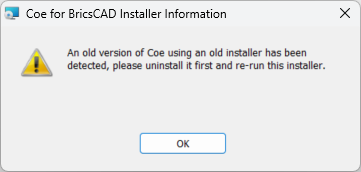
To resolve this issue, please download and run this .reg file to clear the registry of any artifacts left by the uninstallation. Administrator privileges are required.
Some laptop computers with both integrated and dedicated graphics cards might experience an issue when connecting to Hexagon GeoCloud. Users can set BricsCAD program preferences to use the integrated graphics GPU to resolve the issue.
navisworks
Point clouds imported by CloudWorx for Navisworks are not compatible with Navisworks' native transform tools. Using the Move, Rotate, or Scale commands will cause the point cloud to be clipped when orbiting and zooming.
All users with currently valid CCP (Customer Care Package), or with CCP valid as late as 1-October 2025,can run this new version with no new license required.
A current CloudWorx Ultimate license will activate the following products and versions:
CloudWorx for AutoCAD
CloudWorx for Revit
CloudWorx for Navisworks
CloudWorx for BricsCAD
CloudWorx for Bentley