This function creates a textured from an input mesh and images.
Requirements
Select a mesh and
either some spherical images,
or some perspective images,
or an image set (if spherical and perspective images are selected for texturing, only the spherical images will be used),
then launch the command.
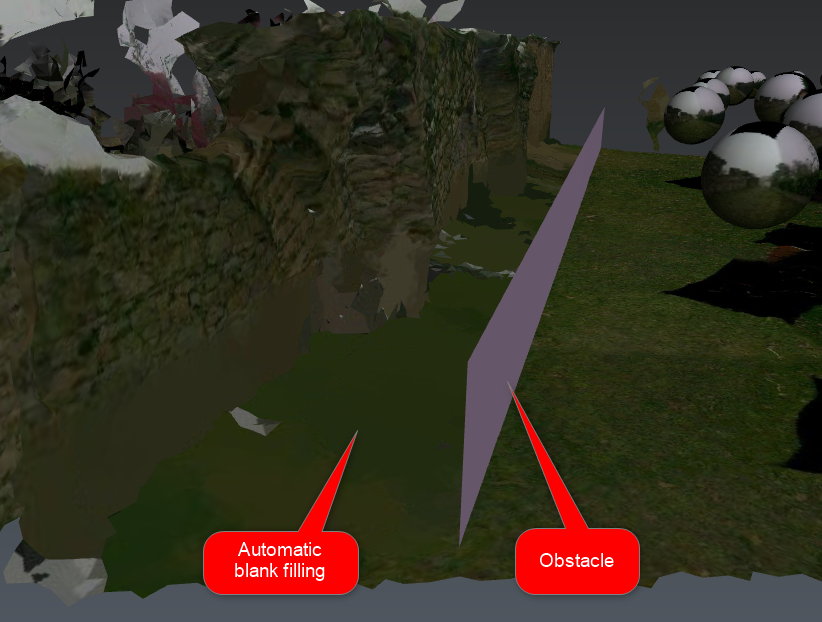
Optionally, select other surface objects used as obstacles. They will filter images and thus the corresponding images won't be applied locally to the mesh.
Set the Pixel size, that is to say the size of pixels (=1/pixel density).
Optionally, uncheck Optimize the mesh to texture the mesh without any reduction. The computation will be longer but the mesh topology won't be modified.
Optionally, check Consider triangles orientation to only texture triangles whose normal is compatible with the image (refer to Exercise: Understand meshes orientation).
If the mesh is already textured, it is possible
to preserve existing texturing. Only blank areas will be filled.
to update current texturing, that is to use the most relevant texture between the existing one and the new one.
Notes
This command reads image masks to avoid texturing the mesh with inappropriate image areas (refer to Image management).
This command fills internal blank areas automatically using the periphery textures (see example in Technical information section).
Actual texture resolution may be lower due to technical limitations.
The created texture is static:
Any mesh faces modification, included using Optimize the mesh later, could either lead to inaccuracy or the loss of texture.
Adjust Textures is only suitable to remove textures locally (before applying locally new ones).
Consequently, it is advised to compute the texture as a last improvement.