
Run Script

This command allows to execute a script.

Requirements
No selection is required to launch the command.
The console window is a text editor, with the following features:
Feature | Description | Shortcut | |
|---|---|---|---|
 | New | Create a new empty file | CTRL + N |
 | Open | Open an existing script file | CTRL + O |
 | Save | Save script file | CTRL + S |
 | Save As | Save script as a new file | CTRL + SHIFT + S |
 | Start Without Debugging | Execute the whole script | F5 |
 | Start Debugging | Execute the script step by step Dev toolsThis feature relies on Google Chrome DevTools. Check the page Debug JavaScript for additional help. | F7 |
 | Stop | Stop the current execution | SHIFT +F5 |
 | Use External File | Switch to External file mode | CTRL + E |
 | Add to Favorites | Add the current script to favorites | |
 | Open Script Documentation | Open help of Script functions | CTRL + F1 |

Notes
The script dialog must have the focus for the shortcuts to activate.
Tips & Tricks
The text editor features syntax coloration, static analysis and code completion based on the types and functions available through the script API. It should help you to write code more easily:
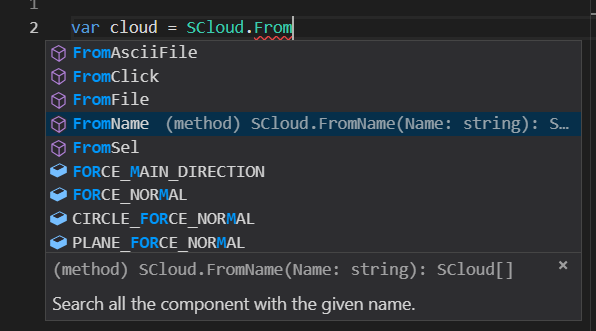
If you want to write your scripts into an external text editor (for example, to edit more than one file at a time), we recommend Visual Studio Code. It provides the same core functionnalities.
In order to benefit from documentation and code completion inside VSCode, you will have to provide the path to the description file (.d.ts) containing the description of the script API. The description file is located into the installation folder.
To do so, just put the following comment at the top of your script (the triple slash /// are required):
/// <reference path="C:\Program Files\Leica Geosystems\Cyclone 3DR\Script\JsDoc\Reshaper.d.ts" />