Overview
A Report Data
is an object available in the TreeView like a mesh, a point cloud, a measure, etc.
The Report Data contains data to use in a report. This data is, mainly, added automatically in the project by commands providing data such as: measurements, comparisons or various analysis (like a Compare Inspect).
A Report Data can contain:
one or several view sets (at least one by default)
tables of data
pictures
other values such as computation results, command parameters, graphics, etc.
When you launch the Report Editor for the first time after creating a report data, a chapter will be automatically created, using a default Report Template.
Interaction
From the tree view
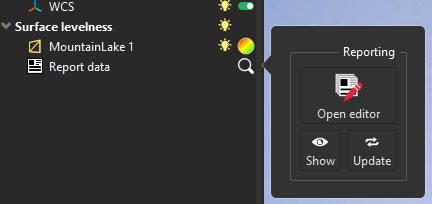
Click on the magnifying glass
next to the Report Data, in the tree view, to see all available actions.
|
|
|---|


Measures
If you add a measure in the folder where the Report Data is, the measure will automatically appear in the table in the corresponding chapter.
When you create a measure by clicking on an object with a color gradient, the measure will be created in the same folder as the object.
Manual creation
You can create a Report Data from measures.
Select measure(s), open the Contextual Menu and choose Add new chapter in the report, or select measures and go to Create Custom Chapter.
Report Data in the Report Editor
All information stored in all Report Data is available in the Data Panel of the Report Editor. So you can create a custom chapter using data from several Report Data.